> ## Documentation Index
> Fetch the complete documentation index at: https://docs.gc.ai/llms.txt
> Use this file to discover all available pages before exploring further.
# File Organization
> Best practices for organizing and maintaining your files in GC AI
## Structure Planning
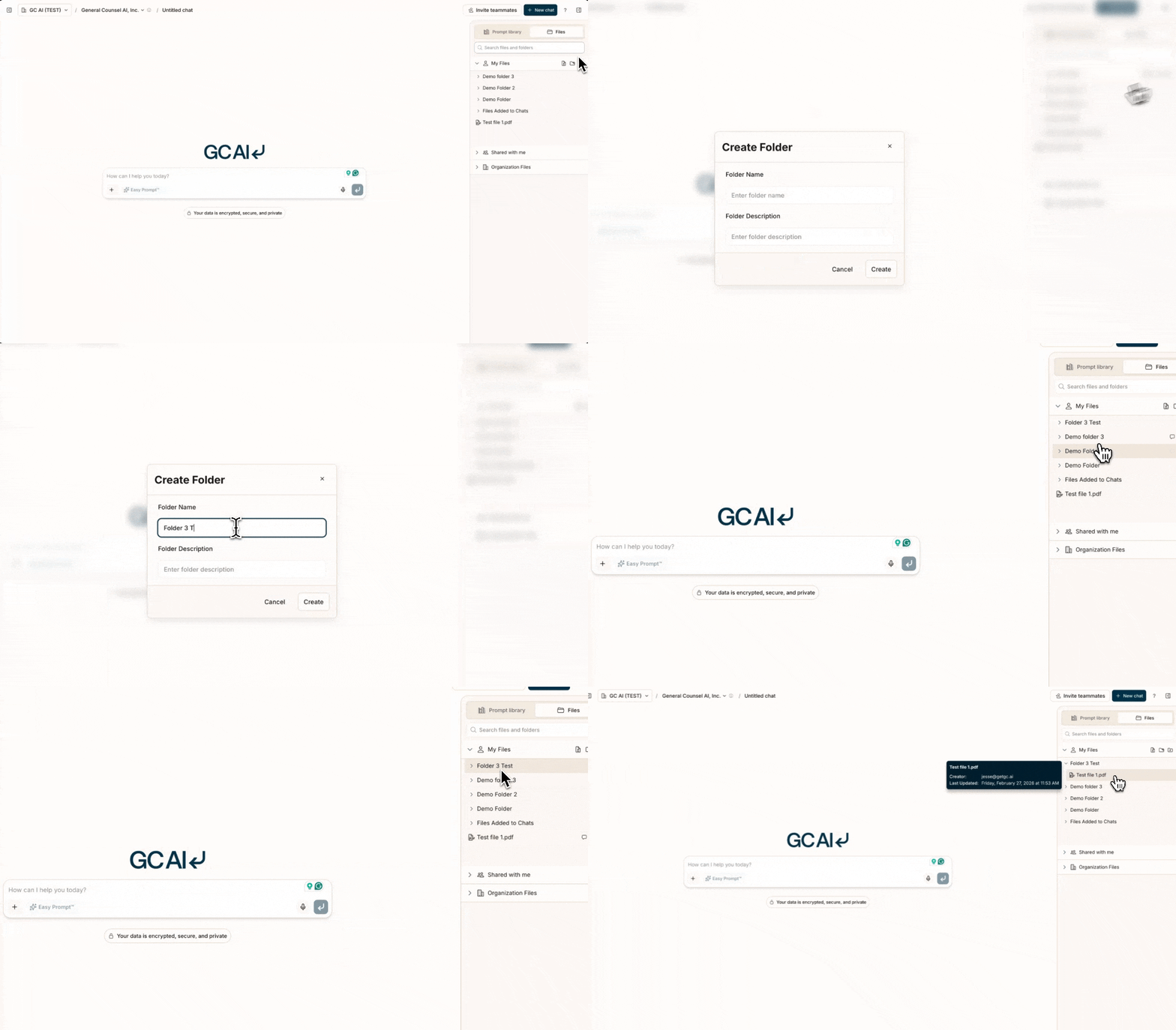 ### Folder Hierarchy
* Create logical main categories for your legal documents
* Use consistent naming conventions across all folders
* Consider how your team accesses different document types
* Plan for scalability as your document collection grows
Example structure:
```
Legal/
├── Contracts/
│ ├── Templates/
│ ├── Executed/
│ └── Negotiations/
├── Policies/
│ ├── Current/
│ └── Archive/
└── Research/
├── Memos/
└── References/
```
## Organization Strategies
### Document Naming
* Use clear, descriptive names that identify content at a glance
* Include relevant dates in a consistent format (YYYY-MM-DD)
* Add version numbers for documents that change over time
* Maintain consistency across all your files
Example:
```
MSA_Acme_Corp_2024-03-15_v2.1
Policy_Data_Privacy_2024_Current
Research_AI_Liability_CA_2024Q1
```
### Metadata Management
* Tag documents with relevant categories for easier searching
* Add descriptions that summarize key document information
* Include key dates such as effective date and review date
* Note related documents to create connections between files
## Access Management
### Permission Structure
* Set appropriate access levels based on document sensitivity
* Create sharing groups for teams that need similar access
* Manage team permissions through the Organization settings
* Review access regularly to maintain security
### Version Control
* Track document versions with clear naming conventions
* Maintain change logs to document what was updated
* Archive old versions in dedicated folders
* Document updates with comments for team awareness
## Best Practices
### Maintenance
* Schedule regular organization reviews quarterly
* Clean up unused files to reduce clutter
* Update outdated content with current information
* Consolidate duplicates to avoid confusion
### Team Coordination
* Share organization guidelines with all team members
* Train new team members on your files structure
* Document your organization procedures for consistency
* Maintain naming and folder conventions across the team
### Using Citations
* Request explicit citations by asking GC AI to "provide citations"
* Hover over citation badges to preview quoted text without leaving the chat
* Click citations to open the source document with the relevant passage highlighted
* Copy text with citations included using the copy button or text selection popover
* See [Citations](/docs/files/citations) for full details
### Smart Document Access
GC AI uses specialized tools to access your documents on demand:
* **Read** specific sections of documents as needed
* **Search** across documents for keywords and phrases
* **Query** documents using semantic search for conceptually related content
This on-demand approach lets you work with more documents than would fit in a single context window. Organize your documents well so the AI can efficiently find what it needs.
Create and document your organization system early. It's much harder to
reorganize later when you have hundreds of documents.
### Folder Hierarchy
* Create logical main categories for your legal documents
* Use consistent naming conventions across all folders
* Consider how your team accesses different document types
* Plan for scalability as your document collection grows
Example structure:
```
Legal/
├── Contracts/
│ ├── Templates/
│ ├── Executed/
│ └── Negotiations/
├── Policies/
│ ├── Current/
│ └── Archive/
└── Research/
├── Memos/
└── References/
```
## Organization Strategies
### Document Naming
* Use clear, descriptive names that identify content at a glance
* Include relevant dates in a consistent format (YYYY-MM-DD)
* Add version numbers for documents that change over time
* Maintain consistency across all your files
Example:
```
MSA_Acme_Corp_2024-03-15_v2.1
Policy_Data_Privacy_2024_Current
Research_AI_Liability_CA_2024Q1
```
### Metadata Management
* Tag documents with relevant categories for easier searching
* Add descriptions that summarize key document information
* Include key dates such as effective date and review date
* Note related documents to create connections between files
## Access Management
### Permission Structure
* Set appropriate access levels based on document sensitivity
* Create sharing groups for teams that need similar access
* Manage team permissions through the Organization settings
* Review access regularly to maintain security
### Version Control
* Track document versions with clear naming conventions
* Maintain change logs to document what was updated
* Archive old versions in dedicated folders
* Document updates with comments for team awareness
## Best Practices
### Maintenance
* Schedule regular organization reviews quarterly
* Clean up unused files to reduce clutter
* Update outdated content with current information
* Consolidate duplicates to avoid confusion
### Team Coordination
* Share organization guidelines with all team members
* Train new team members on your files structure
* Document your organization procedures for consistency
* Maintain naming and folder conventions across the team
### Using Citations
* Request explicit citations by asking GC AI to "provide citations"
* Hover over citation badges to preview quoted text without leaving the chat
* Click citations to open the source document with the relevant passage highlighted
* Copy text with citations included using the copy button or text selection popover
* See [Citations](/docs/files/citations) for full details
### Smart Document Access
GC AI uses specialized tools to access your documents on demand:
* **Read** specific sections of documents as needed
* **Search** across documents for keywords and phrases
* **Query** documents using semantic search for conceptually related content
This on-demand approach lets you work with more documents than would fit in a single context window. Organize your documents well so the AI can efficiently find what it needs.
Create and document your organization system early. It's much harder to
reorganize later when you have hundreds of documents.