> ## Documentation Index
> Fetch the complete documentation index at: https://docs.gc.ai/llms.txt
> Use this file to discover all available pages before exploring further.
# Document Analysis
> Leverage GC AI for comprehensive document analysis
## Document Analysis Features
### 📄 Supported Documents
```markdown Text-Based theme={null}
✓ PDF files
✓ Word documents
✓ Plain text
✓ Markdown
```
```markdown Structured theme={null}
✓ Contracts
✓ Agreements
✓ Policies
✓ Reports
```
## 🔍 Analysis Types
### Content Analysis
1. **Text Analysis**
* Key term extraction
* Concept identification
* Pattern recognition
* Semantic analysis
2. **Structure Analysis**
* Document organization
* Section hierarchy
* Format consistency
* Reference mapping
### Advanced Features
```mermaid theme={null}
graph LR
A[Upload] --> B[Parse]
B --> C[Analyze]
C --> D[Extract]
D --> E[Report]
```
### Tracked Changes & Comments Support
GC AI automatically detects and analyzes:
* **Tracked Changes**: Review all edits, additions, and deletions in DOCX and PDF files
* **Comments**: Extract and summarize feedback from multiple reviewers
* **Redlines**: Analyze proposed modifications and revision history
This feature works seamlessly with documents that contain tracked changes from Microsoft Word or other document editors that export to PDF/DOCX formats.
**Important:** GC AI can only read comments and redlines/tracked changes from PDF and Word files uploaded since August 18, 2025. Documents uploaded before this date will not have their comments and tracked changes accessible for analysis.
### Table Redline Limitations
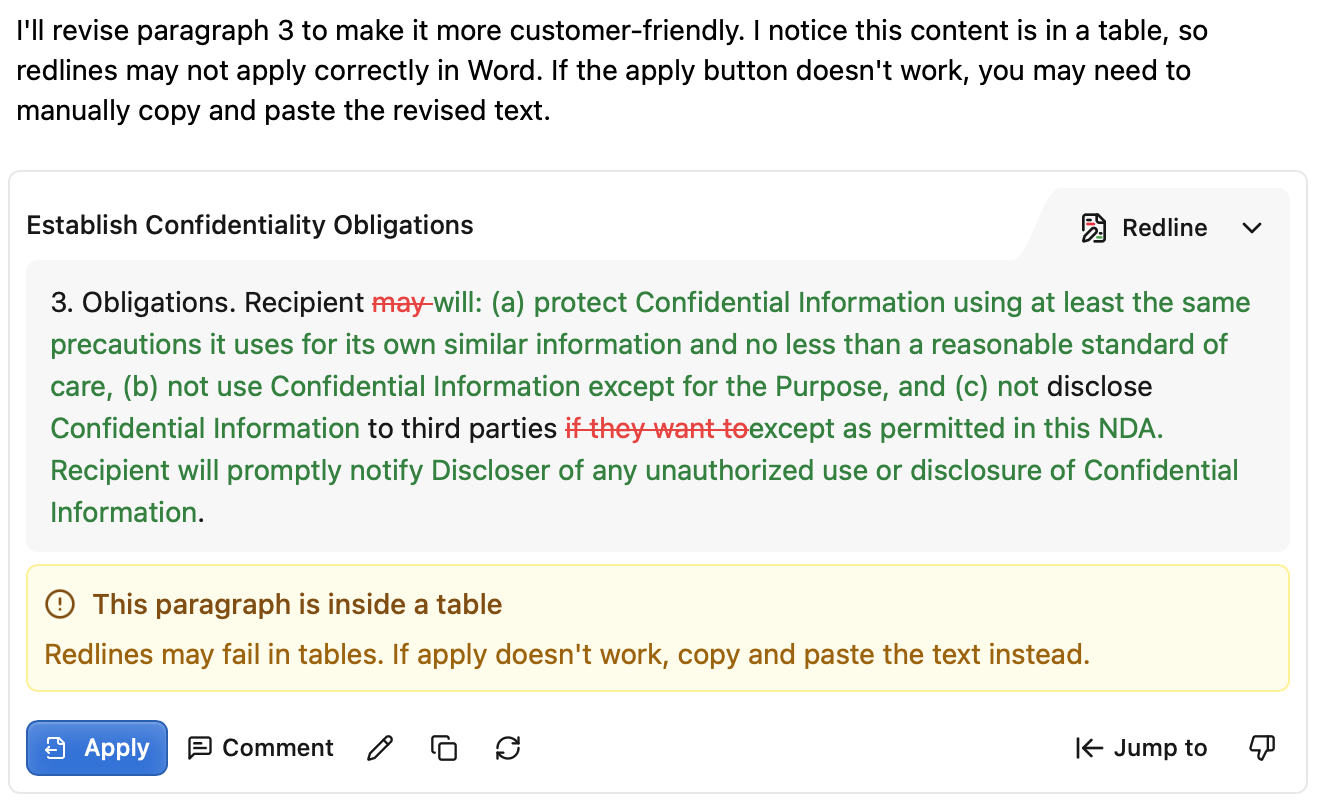
GC AI has limitations when applying redlines to content within tables, depending on the document, they may not work. The system now provides:
* **Updated Prompt**: Updates prompt to let user know up front that redlines may not apply correctly in a table.
* **Proactive Warnings**: You'll see warning messages before attempting to apply redlines to table content
* **Manual Workaround**: A new copy button in the action toolbar allows you to extract the most recent version of the raw text, so you can apply the redline manually
This ensures you're aware of potential issues and have alternative methods to work with table content effectively.
## 🎯 Analysis Techniques
### Effective Prompting
```
Context: Analyzing [document type]
Focus areas:
1. [specific aspect]
2. [key elements]
3. [critical points]
Output: [desired format]
```
### Analysis Frameworks
* IRAC method
* Risk assessment matrix
* Compliance checklist
* Impact analysis
Use structured prompts to get consistent, formatted outputs for easier review.
## 📊 Output and Export Options
### Report Types
1. **Summary Reports**
* Executive overview
* Key findings
* Action items
* Recommendations
2. **Detailed Analysis**
* Section-by-section review
* Risk assessment
* Compliance analysis
* Comparative analysis
### Export Formats
* **Chat Export:** PDF, DOCX, or Markdown for full conversations or individual messages
* **Table Export:** CSV, XLSX, PDF, DOCX, or Markdown for data tables
* **Slides:** Generate PowerPoint presentations from your analysis
* See [How to Download](/docs/chat/how-to-download) for details
### Additional Features
* **[Research Agent](/docs/chat/research):** Combine document analysis with parallel web research for comprehensive context
* **[Context Usage Indicator](/docs/chat/context-window):** Monitor how much context your documents are using
* **Smart Document Access:** GC AI reads, searches, and queries your documents on demand rather than loading everything at once
## 🔄 Workflow Integration
### Process Steps
1. Document upload
2. Initial analysis
3. Detailed review
4. Team collaboration
5. Final output
Always validate AI analysis against source documents and expert knowledge.
## 🔐 Best Practices
### Quality Control
* Verify source material
* Cross-reference findings
* Document assumptions
* Track changes
### Security Considerations
* Check sharing settings
* Manage access control
* Maintain audit trails
* Secure sensitive data
Always review AI-generated analysis for accuracy and completeness.