> ## Documentation Index
> Fetch the complete documentation index at: https://docs.gc.ai/llms.txt
> Use this file to discover all available pages before exploring further.

# Contract Risk Heatmap

> Upload a contract and get a visual risk analysis with severity levels, clause references, and suggested redlines.

<Info>**Developer tutorial.** Requires Node.js, React, TypeScript, and command-line experience.</Info>

Upload a contract and get back a severity-ranked list of risky clauses with suggested redlines, all in a single-page React app that talks to the GC AI API.

<Frame>
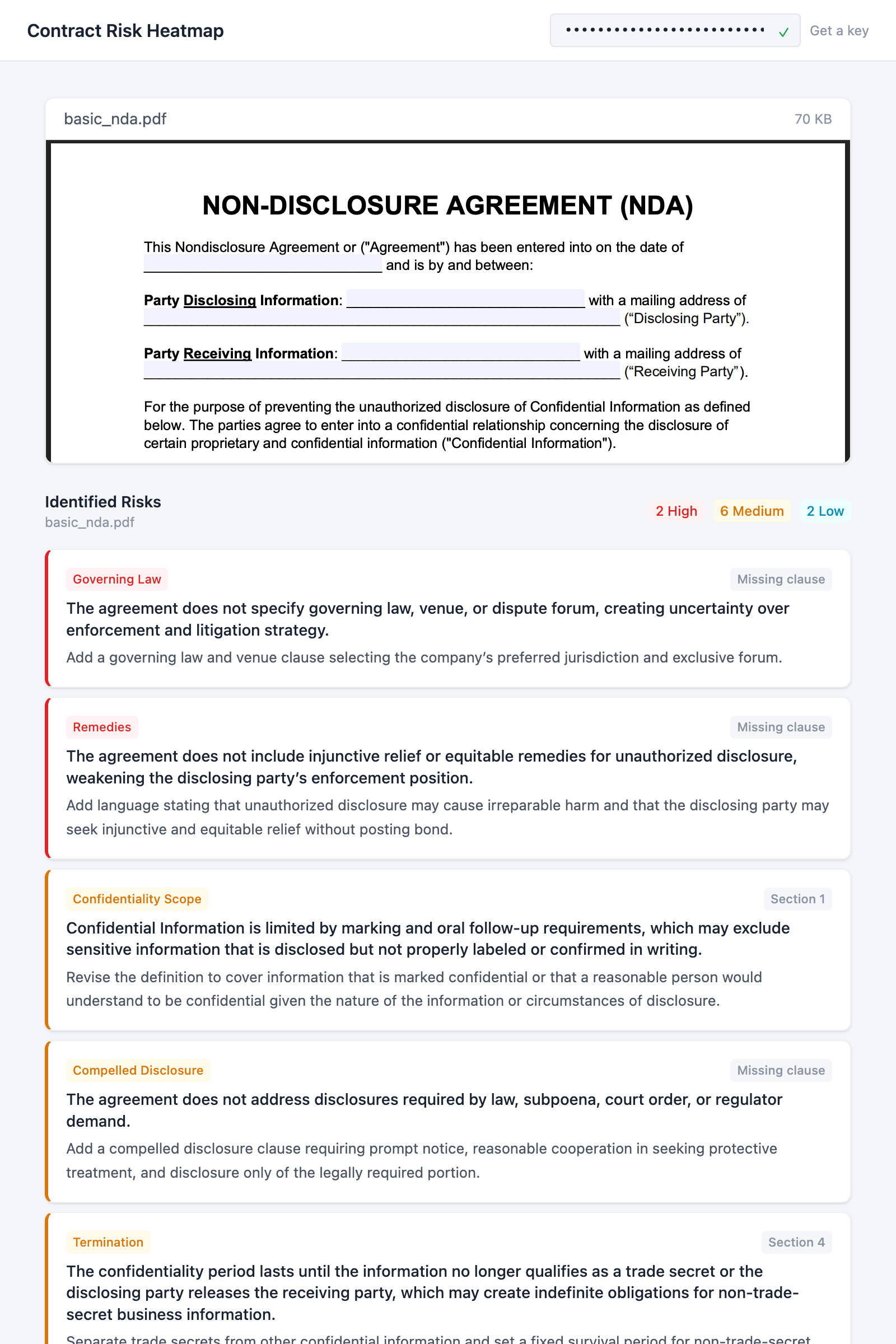
  <img src="https://mintcdn.com/gcai/PDDupZNWNlKAYZ3B/images/demo-heatmap-results.png?fit=max&auto=format&n=PDDupZNWNlKAYZ3B&q=85&s=c2409e14d6fd3b1d7cee8e6b2a6fc0fa" alt="Contract Risk Heatmap app showing a PDF preview and identified risks sorted by severity with category badges, clause references, and suggested redlines" width="1600" height="2400" data-path="images/demo-heatmap-results.png" />
</Frame>

## What you'll build

A drag-and-drop webapp where a user pastes their API key, uploads a PDF contract, and sees a heatmap of risks sorted by severity. Each risk includes a clause reference, category, and suggested redline. The whole thing runs on two API calls: one to upload the file, one to analyze it.

## API endpoints

| Method | Endpoint                                                        | What it does                                |
| ------ | --------------------------------------------------------------- | ------------------------------------------- |
| `GET`  | [`/v1/folders`](/api-reference/list-folders)                    | Validates the API key on paste              |
| `POST` | [`/v1/files`](/api-reference/upload-file)                       | Uploads the contract                        |
| `GET`  | [`/v1/files/:id`](/api-reference/get-file-status)               | Polls until the file is processed           |
| `POST` | [`/v1/chat/completions`](/api-reference/create-chat-completion) | Sends the analysis prompt (async, `wait=0`) |
| `GET`  | [`/v1/jobs/:id`](/api-reference/get-async-job)                  | Polls until the analysis is complete        |

Want to skip ahead? [View on GitHub](https://github.com/GC-AI-Inc/api-demo-heatmap) or [run on Replit](https://replit.com/github/GC-AI-Inc/api-demo-heatmap).

## Prerequisites

* A [GC AI API key](/api-reference/introduction#authentication) (get one from **Settings > API** in the app)
* [Node.js](https://nodejs.org/) 18+

## Build the app

<Steps>
  <Step title="Scaffold the project">
    Create a new Vite + React + TypeScript project and install Tailwind CSS:

    ```bash theme={null}
    npm create vite@latest api-demo-heatmap -- --template react-ts
    cd api-demo-heatmap
    npm install tailwindcss @tailwindcss/vite react-pdf
    npm install
    ```

    Open `vite.config.ts` and add the Tailwind plugin plus an API proxy for development:

    ```typescript vite.config.ts theme={null}
    import { defineConfig } from "vite";
    import react from "@vitejs/plugin-react";
    import tailwindcss from "@tailwindcss/vite";

    export default defineConfig({
      plugins: [react(), tailwindcss()],
      server: {
        proxy: {
          "/api": {
            target: "https://app.gc.ai",
            changeOrigin: true,
          },
        },
      },
    });
    ```

    The proxy forwards `/api` requests to GC AI during development so you don't hit CORS issues from `localhost`.

    Now clear out the starter code. We'll write everything from scratch:

    ```bash theme={null}
    rm src/App.css src/assets -rf
    ```

    Replace `src/index.css` with the Tailwind import and a minimal color theme:

    ```css src/index.css theme={null}
    @import "tailwindcss";

    @theme {
      --color-surface: #f5f6f8;
      --color-card: #ffffff;
      --color-border: #e2e5ea;
      --color-border-light: #eef0f3;
      --color-ink: #1a2332;
      --color-ink-secondary: #4b5563;
      --color-ink-muted: #8b95a5;
      --color-accent: #2563eb;
      --color-severity-high: #dc2626;
      --color-severity-high-bg: #fef2f2;
      --color-severity-medium: #d97706;
      --color-severity-medium-bg: #fffbeb;
      --color-severity-low: #0891b2;
      --color-severity-low-bg: #ecfeff;
      --color-success: #16a34a;
      --color-error: #dc2626;
      --color-error-bg: #fef2f2;
    }
    ```

    Create two empty files. These are the only two source files we'll write:

    ```bash theme={null}
    echo '' > src/api.ts
    echo 'export default function App() { return <div>hello</div> }' > src/App.tsx
    ```

    Run `npm run dev` to confirm the scaffold works before we start building.
  </Step>

  <Step title="Build the API client">
    The API client goes in `src/api.ts`. It wraps the GC AI endpoints into three functions: `validateApiKey`, `uploadFile`, and `analyzeContract`.

    Start with the types. `ContractRisk` is the shape we'll ask the model to return:

    ```typescript src/api.ts theme={null}
    export interface ContractRisk {
      severity: "high" | "medium" | "low";
      category: string;
      clause: string;
      issue: string;
      redline: string;
    }

    interface FileResponse {
      id: string;
      name: string;
      status: "pending" | "processing" | "ready" | "failed";
    }

    interface JobResponse<T> {
      job_id: string;
      kind: string;
      status: "pending" | "running" | "succeeded" | "failed" | "canceled";
      result: T | null;
      error: { code: string; message: string } | null;
      created_at: string;
      completed_at: string | null;
    }

    interface ChatResult {
      result: string;
      chat_id: string;
    }
    ```

    Next, a small helper that attaches the API key to every request and throws on non-2xx responses:

    ```typescript src/api.ts theme={null}
    const API_BASE = "/api/external/v1";

    async function apiRequest(
      apiKey: string,
      path: string,
      options: RequestInit = {},
    ): Promise<Response> {
      const res = await fetch(`${API_BASE}${path}`, {
        ...options,
        headers: {
          Authorization: apiKey,
          ...options.headers,
        },
      });
      if (!res.ok) {
        const body = await res.json().catch(() => ({}));
        throw new Error(
          (body as { error?: string }).error ??
            `API error ${res.status}: ${res.statusText}`,
        );
      }
      return res;
    }
    ```

    **Key validation.** A lightweight `GET /folders?limit=1` call checks whether the API key is valid without creating any resources:

    ```typescript src/api.ts theme={null}
    export async function validateApiKey(apiKey: string): Promise<boolean> {
      try {
        const res = await fetch(`${API_BASE}/folders?limit=1`, {
          headers: { Authorization: apiKey },
        });
        return res.ok;
      } catch {
        return false;
      }
    }
    ```

    **File upload.** `uploadFile` posts the file, then polls `GET /files/:id` every 2 seconds until the status is `ready`. The caller just awaits the result:

    ```typescript src/api.ts theme={null}
    export async function uploadFile(
      apiKey: string,
      file: File,
    ): Promise<FileResponse> {
      const form = new FormData();
      form.append("file", file);
      const res = await fetch(`${API_BASE}/files`, {
        method: "POST",
        headers: { Authorization: apiKey },
        body: form,
      });
      if (!res.ok) {
        const body = await res.json().catch(() => ({}));
        throw new Error(
          (body as { error?: string }).error ??
            `Upload failed: ${res.status} ${res.statusText}`,
        );
      }
      const uploaded: FileResponse = await res.json();
      return waitForFile(apiKey, uploaded.id);
    }

    async function waitForFile(
      apiKey: string,
      fileId: string,
    ): Promise<FileResponse> {
      for (let i = 0; i < 60; i++) {
        const res = await apiRequest(apiKey, `/files/${fileId}`);
        const file: FileResponse = await res.json();
        if (file.status === "ready") return file;
        if (file.status === "failed") throw new Error("File processing failed");
        await new Promise((r) => setTimeout(r, 2000));
      }
      throw new Error("Timed out waiting for file processing");
    }
    ```

    **Contract analysis.** `analyzeContract` sends a chat completion with `wait=0`, which returns a job ID immediately instead of blocking. It polls the job until the model finishes, then parses the structured JSON out of the response:

    ```typescript src/api.ts theme={null}
    const ANALYSIS_PROMPT = `Analyze this contract for legal risks. Return a JSON array of risk objects.

    Each risk object must have exactly these fields:
    - "severity": "high", "medium", or "low"
    - "category": a short label (e.g. "Liability", "Termination", "IP", "Data Privacy", "Indemnification")
    - "clause": the section or clause reference (e.g. "Section 7.1", "Clause 4(b)")
    - "issue": a one-sentence description of the risk
    - "redline": a one-sentence suggested revision

    Return ONLY the JSON array, no other text. Example format:
    [{"severity":"high","category":"Liability","clause":"Section 5.2","issue":"Unlimited liability exposure","redline":"Cap liability at 12 months of fees paid"}]`;

    export async function analyzeContract(
      apiKey: string,
      fileId: string,
    ): Promise<ContractRisk[]> {
      const res = await apiRequest(apiKey, "/chat/completions?wait=0", {
        method: "POST",
        headers: { "Content-Type": "application/json" },
        body: JSON.stringify({
          message: ANALYSIS_PROMPT,
          file_ids: [fileId],
        }),
      });
      const job: JobResponse<ChatResult> = await res.json();
      if (job.status === "failed") {
        throw new Error(job.error?.message ?? "Analysis failed");
      }
      return waitForAnalysis(apiKey, job.job_id);
    }

    async function waitForAnalysis(
      apiKey: string,
      jobId: string,
    ): Promise<ContractRisk[]> {
      for (let i = 0; i < 90; i++) {
        await new Promise((r) => setTimeout(r, 2000));
        const res = await apiRequest(apiKey, `/jobs/${jobId}`);
        const job: JobResponse<ChatResult> = await res.json();
        if (job.status === "succeeded" && job.result) {
          return parseRisks(job.result.result);
        }
        if (job.status === "failed") {
          throw new Error(job.error?.message ?? "Analysis failed");
        }
      }
      throw new Error("Timed out waiting for analysis");
    }

    function parseRisks(text: string): ContractRisk[] {
      const jsonMatch = text.match(/\[[\s\S]*\]/);
      if (!jsonMatch) throw new Error("Could not parse risk analysis response");
      return JSON.parse(jsonMatch[0]);
    }
    ```

    That's the whole API layer. Three exported functions: `validateApiKey(key)`, `uploadFile(key, file)`, and `analyzeContract(key, fileId)`.
  </Step>

  <Step title="App shell: header and footer">
    Now we start building `src/App.tsx`. This first pass just sets up the header (with the API key input), an empty main area, and a footer:

    ```tsx src/App.tsx theme={null}
    import { useCallback, useEffect, useState } from "react";
    import { Document, Page, pdfjs } from "react-pdf";
    import "react-pdf/dist/Page/AnnotationLayer.css";
    import "react-pdf/dist/Page/TextLayer.css";
    import { validateApiKey, uploadFile, analyzeContract } from "./api";
    import type { ContractRisk } from "./api";

    pdfjs.GlobalWorkerOptions.workerSrc = `https://unpkg.com/pdfjs-dist@${pdfjs.version}/build/pdf.worker.min.mjs`;

    function App() {
      const [apiKey, setApiKey] = useState(
        () => localStorage.getItem("gcai_api_key") ?? "",
      );
      const [keyValid, setKeyValid] = useState<boolean | null>(null);
      const [keyChecking, setKeyChecking] = useState(false);

      const checkKey = useCallback(async (key: string) => {
        if (!key.trim()) {
          setKeyValid(null);
          return;
        }
        setKeyChecking(true);
        const valid = await validateApiKey(key.trim());
        setKeyValid(valid);
        setKeyChecking(false);
        if (valid) {
          localStorage.setItem("gcai_api_key", key.trim());
        }
      }, []);

      useEffect(() => {
        if (apiKey) checkKey(apiKey);
      }, []);

      function handleKeyChange(e: React.ChangeEvent<HTMLInputElement>) {
        setApiKey(e.target.value);
        setKeyValid(null);
      }

      return (
        <div className="flex min-h-screen flex-col bg-surface">
          <header className="border-b border-border bg-card px-6 py-3">
            <div className="mx-auto flex max-w-3xl items-center justify-between gap-4">
              <h1 className="shrink-0 text-base font-semibold text-ink">
                Contract Risk Heatmap
              </h1>
              <form
                onSubmit={(e) => { e.preventDefault(); checkKey(apiKey); }}
                className="flex items-center gap-2"
              >
                <div className="relative">
                  <input
                    type="password"
                    value={apiKey}
                    onChange={handleKeyChange}
                    onBlur={() => checkKey(apiKey)}
                    placeholder="Paste your GC AI API key"
                    className="w-56 rounded border border-border bg-surface px-3 py-1.5 pr-8 font-mono text-xs text-ink placeholder:text-ink-muted focus:border-accent focus:ring-1 focus:ring-accent focus:outline-none"
                  />
                  <span className="absolute top-1/2 right-2.5 -translate-y-1/2">
                    {keyChecking && (
                      <span className="block size-3 animate-spin rounded-full border border-border border-t-accent" />
                    )}
                    {!keyChecking && keyValid === true && (
                      <span className="text-xs text-success">&#10003;</span>
                    )}
                    {!keyChecking && keyValid === false && (
                      <span className="text-xs text-error">&#10007;</span>
                    )}
                  </span>
                </div>
                <a
                  href="https://app.gc.ai/settings/api"
                  target="_blank"
                  rel="noopener noreferrer"
                  className="whitespace-nowrap text-xs text-ink-muted hover:text-accent"
                >
                  Get a key
                </a>
              </form>
            </div>
          </header>

          <main className="mx-auto flex w-full max-w-3xl flex-1 flex-col items-center px-6 py-8">
            {/* We'll fill this in over the next steps */}
          </main>

          <footer className="border-t border-border px-6 py-3 text-center text-xs text-ink-muted">
            Powered by the{" "}
            <a
              href="https://docs.gc.ai/api-reference/introduction"
              target="_blank"
              rel="noopener noreferrer"
              className="text-accent hover:underline"
            >
              GC AI API
            </a>
          </footer>
        </div>
      );
    }

    export default App;
    ```

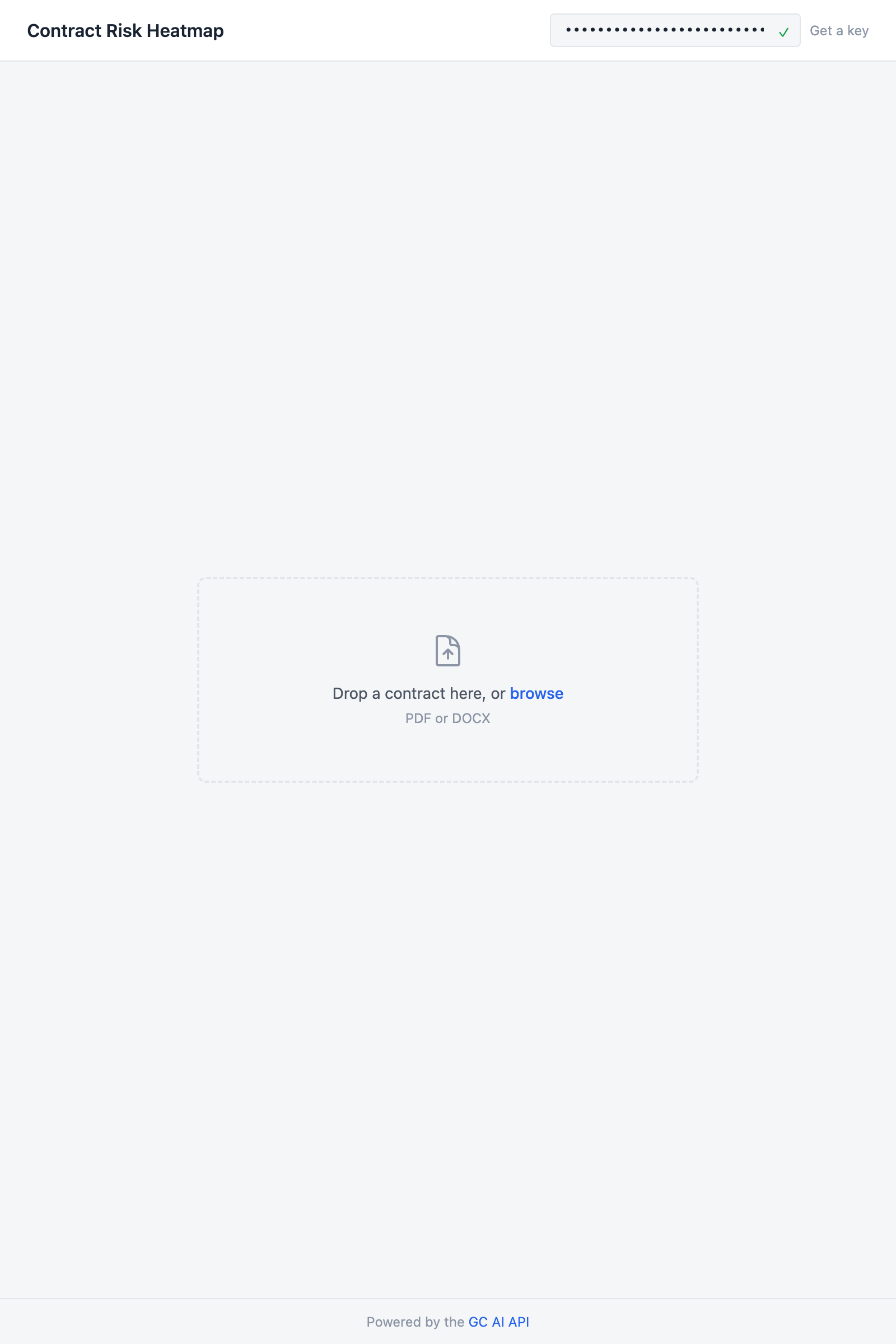
    The key validates on blur and on page load (if one was saved to `localStorage` from a previous session). A green checkmark or red X shows up inline so you know right away whether the key is good.

    <Frame>
      <img src="https://mintcdn.com/gcai/PDDupZNWNlKAYZ3B/images/demo-heatmap-key-validated.png?fit=max&auto=format&n=PDDupZNWNlKAYZ3B&q=85&s=89a743d21af185866d3bad08cecfd8ce" alt="App header showing Contract Risk Heatmap title, API key input with green checkmark, and file upload drop zone" width="1600" height="2400" data-path="images/demo-heatmap-key-validated.png" />
    </Frame>
  </Step>

  <Step title="File upload">
    Add a `FileUpload` component above the `App` function. It supports both drag-and-drop and click-to-browse:

    ```tsx src/App.tsx (above App) theme={null}
    function FileUpload({
      onFileSelected,
      disabled,
    }: {
      onFileSelected: (file: File) => void;
      disabled: boolean;
    }) {
      const [dragOver, setDragOver] = useState(false);

      const handleDrop = useCallback(
        (e: React.DragEvent) => {
          e.preventDefault();
          setDragOver(false);
          const file = e.dataTransfer.files[0];
          if (file) onFileSelected(file);
        },
        [onFileSelected],
      );

      const handleChange = useCallback(
        (e: React.ChangeEvent<HTMLInputElement>) => {
          const file = e.target.files?.[0];
          if (file) onFileSelected(file);
        },
        [onFileSelected],
      );

      return (
        <div
          onDragOver={(e) => { e.preventDefault(); setDragOver(true); }}
          onDragLeave={() => setDragOver(false)}
          onDrop={handleDrop}
          className={`flex w-full max-w-md flex-col items-center rounded-lg border-2 border-dashed p-12 transition-colors ${
            dragOver ? "border-accent bg-accent/5" : "border-border"
          } ${disabled ? "pointer-events-none opacity-50" : "cursor-pointer hover:border-ink-muted"}`}
          onClick={() => {
            if (!disabled) document.getElementById("file-input")?.click();
          }}
        >
          <svg className="mb-3 size-8 text-ink-muted" fill="none" viewBox="0 0 24 24" stroke="currentColor" strokeWidth={1.5}>
            <path strokeLinecap="round" strokeLinejoin="round" d="M19.5 14.25v-2.625a3.375 3.375 0 0 0-3.375-3.375h-1.5A1.125 1.125 0 0 1 13.5 7.125v-1.5a3.375 3.375 0 0 0-3.375-3.375H8.25m6.75 12-3-3m0 0-3 3m3-3v6m-1.5-15H5.625c-.621 0-1.125.504-1.125 1.125v17.25c0 .621.504 1.125 1.125 1.125h12.75c.621 0 1.125-.504 1.125-1.125V11.25a9 9 0 0 0-9-9Z" />
          </svg>
          <p className="text-sm text-ink-secondary">
            Drop a contract here, or{" "}
            <span className="font-medium text-accent">browse</span>
          </p>
          <p className="mt-1 text-xs text-ink-muted">PDF</p>
          <input id="file-input" type="file" accept=".pdf" onChange={handleChange} className="hidden" />
        </div>
      );
    }
    ```
  </Step>

  <Step title="Document preview">
    Add a `DocumentPreview` component that renders the uploaded PDF using `react-pdf`. We use this instead of a native iframe embed so the preview works in sandboxed environments like Replit:

    ```tsx src/App.tsx (above App) theme={null}
    function DocumentPreview({ file }: { file: File }) {
      const [numPages, setNumPages] = useState(0);

      return (
        <div className="w-full overflow-hidden rounded-lg border border-border-light bg-card shadow-sm">
          <div className="flex items-center justify-between border-b border-border-light px-4 py-2">
            <span className="text-sm text-ink-secondary">{file.name}</span>
            <span className="text-xs text-ink-muted">
              {(file.size / 1024).toFixed(0)} KB
            </span>
          </div>
          <div className="max-h-96 overflow-y-auto">
            <Document file={file} onLoadSuccess={({ numPages: n }) => setNumPages(n)}>
              {Array.from({ length: numPages }, (_, i) => (
                <Page key={i + 1} pageNumber={i + 1} width={700} />
              ))}
            </Document>
          </div>
        </div>
      );
    }
    ```

    This renders from the browser's local `File` object, not from anything returned by the API. The preview shows up the moment the user drops a file, even while the upload is still running.
  </Step>

  <Step title="Risk heatmap">
    Add the `RiskHeatmap` component that renders the analysis results. Each risk gets a card with a colored left border for severity, a category badge, a clause reference, and a suggested redline:

    ```tsx src/App.tsx (above App) theme={null}
    const severityStyles = {
      high: {
        border: "border-l-severity-high",
        badge: "bg-severity-high-bg text-severity-high",
        label: "High",
      },
      medium: {
        border: "border-l-severity-medium",
        badge: "bg-severity-medium-bg text-severity-medium",
        label: "Medium",
      },
      low: {
        border: "border-l-severity-low",
        badge: "bg-severity-low-bg text-severity-low",
        label: "Low",
      },
    };

    function SeveritySummary({ risks }: { risks: ContractRisk[] }) {
      const counts = { high: 0, medium: 0, low: 0 };
      for (const r of risks) counts[r.severity]++;

      return (
        <div className="flex gap-2 text-xs">
          {(["high", "medium", "low"] as const).map((level) =>
            counts[level] > 0 ? (
              <span
                key={level}
                className={`rounded px-1.5 py-0.5 font-medium ${severityStyles[level].badge}`}
              >
                {counts[level]} {severityStyles[level].label}
              </span>
            ) : null,
          )}
        </div>
      );
    }

    function RiskHeatmap({
      risks,
      fileName,
    }: {
      risks: ContractRisk[];
      fileName: string;
    }) {
      const sorted = [...risks].sort((a, b) => {
        const order = { high: 0, medium: 1, low: 2 };
        return order[a.severity] - order[b.severity];
      });

      return (
        <div className="w-full">
          <div className="mb-4 flex items-center justify-between">
            <div>
              <h2 className="text-sm font-semibold text-ink">Identified Risks</h2>
              <p className="text-xs text-ink-muted">{fileName}</p>
            </div>
            <SeveritySummary risks={risks} />
          </div>

          <div className="space-y-2">
            {sorted.map((risk, i) => {
              const style = severityStyles[risk.severity];
              return (
                <div
                  key={i}
                  className={`rounded-lg border border-border-light border-l-[3px] bg-card p-4 shadow-sm ${style.border}`}
                >
                  <div className="flex items-center justify-between">
                    <span className={`shrink-0 rounded px-1.5 py-0.5 text-[11px] font-medium ${style.badge}`}>
                      {risk.category}
                    </span>
                    <span className="shrink-0 rounded bg-surface px-1.5 py-0.5 text-[11px] font-medium text-ink-muted">
                      {risk.clause}
                    </span>
                  </div>
                  <p className="mt-1.5 text-sm font-medium leading-snug text-ink">
                    {risk.issue}
                  </p>
                  <p className="mt-1 text-[13px] leading-relaxed text-ink-secondary">
                    {risk.redline}
                  </p>
                </div>
              );
            })}
          </div>
        </div>
      );
    }
    ```

    Risks are sorted high to low. The `SeveritySummary` at the top acts as a legend, with colored count badges that match the left-border colors on the cards below.
  </Step>

  <Step title="Wire it up">
    The last piece is the state machine and the conditional rendering that wires everything together.

    Define the status type and status messages above the `App` function:

    ```tsx src/App.tsx (above App) theme={null}
    type Status =
      | { step: "idle" }
      | { step: "uploading"; fileName: string; file: File }
      | { step: "analyzing"; fileName: string; file: File }
      | { step: "done"; fileName: string; file: File; risks: ContractRisk[] }
      | { step: "error"; message: string };

    const statusMessages: Record<string, string> = {
      uploading: "Uploading contract...",
      analyzing: "Analyzing risks, this may take a minute...",
    };
    ```

    Each variant of `Status` carries only the data the UI needs for that state. TypeScript narrows the type in each rendering branch, so you can't accidentally access `risks` while still uploading.

    Add the state and handler inside `App`:

    ```tsx theme={null}
    const [status, setStatus] = useState<Status>({ step: "idle" });

    async function handleFile(file: File) {
      const key = apiKey.trim();
      try {
        setStatus({ step: "uploading", fileName: file.name, file });
        const uploaded = await uploadFile(key, file);

        setStatus({ step: "analyzing", fileName: file.name, file });
        const risks = await analyzeContract(key, uploaded.id);

        setStatus({ step: "done", fileName: file.name, file, risks });
      } catch (err) {
        setStatus({
          step: "error",
          message: err instanceof Error ? err.message : "Something went wrong",
        });
      }
    }

    function reset() {
      setStatus({ step: "idle" });
    }

    const isWorking =
      status.step === "uploading" || status.step === "analyzing";
    const isReady = keyValid === true && !isWorking && status.step !== "done";
    ```

    Finally, fill in the `<main>` element:

    ```tsx theme={null}
    <main className="mx-auto flex w-full max-w-3xl flex-1 flex-col items-center px-6 py-8">
      {keyValid === false && (
        <div className="mb-6 w-full rounded border border-error/20 bg-error-bg px-4 py-2 text-sm text-error">
          Invalid API key. Check your key in{" "}
          <a href="https://app.gc.ai/settings/api" target="_blank" rel="noopener noreferrer" className="underline">
            Settings &rarr; API
          </a>
        </div>
      )}

      {!keyValid && !keyChecking && status.step === "idle" && (
        <div className="flex flex-1 flex-col items-center justify-center">
          <div className="rounded-lg border border-dashed border-border p-16 text-center">
            <p className="text-sm text-ink-secondary">
              Enter your GC AI API key above to get started
            </p>
            <p className="mt-1 text-xs text-ink-muted">
              Upload a contract and get a structured risk analysis
            </p>
          </div>
        </div>
      )}

      {isReady && status.step === "idle" && (
        <div className="flex w-full flex-1 flex-col items-center justify-center">
          <FileUpload onFileSelected={handleFile} disabled={false} />
        </div>
      )}

      {(isWorking || status.step === "done") && (
        <div className="flex w-full flex-col gap-6">
          {"file" in status && <DocumentPreview file={status.file} />}

          {isWorking && (
            <div className="flex flex-col items-center gap-3 py-8">
              <div className="size-8 animate-spin rounded-full border-2 border-border border-t-accent" />
              <p className="text-sm text-ink-secondary">
                {statusMessages[status.step]}
              </p>
            </div>
          )}

          {status.step === "done" && (
            <>
              <RiskHeatmap risks={status.risks} fileName={status.fileName} />
              <div className="flex justify-center pb-4">
                <button
                  onClick={reset}
                  className="rounded border border-border bg-card px-4 py-2 text-sm text-ink-secondary shadow-sm hover:bg-surface"
                >
                  Analyze another contract
                </button>
              </div>
            </>
          )}
        </div>
      )}

      {status.step === "error" && (
        <div className="flex flex-1 flex-col items-center justify-center gap-3">
          <div className="rounded border border-error/20 bg-error-bg px-4 py-3 text-sm text-error">
            {status.message}
          </div>
          <button onClick={reset} className="text-sm text-accent hover:underline">
            Try again
          </button>
        </div>
      )}
    </main>
    ```

    The UI shows one thing at a time based on the current status: a prompt to enter a key, the file upload zone, a spinner, or the results. The `DocumentPreview` stays mounted across the uploading/analyzing/done transitions so it doesn't flash.

    Run `npm run dev`, paste your API key, and drop a contract PDF. You should see the risk heatmap appear after about 30-60 seconds.

    <Frame>
      <img src="https://mintcdn.com/gcai/PDDupZNWNlKAYZ3B/images/demo-heatmap-ready.png?fit=max&auto=format&n=PDDupZNWNlKAYZ3B&q=85&s=4b3d6db16fdb1ef4057b07b71bc0bc5f" alt="Finished app showing a PDF preview of the uploaded contract and risk heatmap cards sorted by severity" width="1600" height="2400" data-path="images/demo-heatmap-ready.png" />
    </Frame>

    <Frame>
      <img src="https://mintcdn.com/gcai/PDDupZNWNlKAYZ3B/images/demo-heatmap-results.png?fit=max&auto=format&n=PDDupZNWNlKAYZ3B&q=85&s=c2409e14d6fd3b1d7cee8e6b2a6fc0fa" alt="Finished app showing a PDF preview of the uploaded contract and risk heatmap cards sorted by severity" width="1600" height="2400" data-path="images/demo-heatmap-results.png" />
    </Frame>
  </Step>
</Steps>

## Source code

<CardGroup cols={2}>
  <Card title="GitHub" href="https://github.com/GC-AI-Inc/api-demo-heatmap">
    Clone the repo and run locally
  </Card>

  <Card title="Replit" href="https://replit.com/github/GC-AI-Inc/api-demo-heatmap">
    Run it in the browser
  </Card>
</CardGroup>