> ## Documentation Index
> Fetch the complete documentation index at: https://docs.gc.ai/llms.txt
> Use this file to discover all available pages before exploring further.

# Triage & Route

> Classify legal requests, pick the right playbook, and run a full review automatically.

<Info>**Developer tutorial.** Requires Node.js, React, TypeScript, and command-line experience.</Info>

Classify incoming legal requests by type and risk, pick the right playbook from your account, and run a full review against the attached document. Two AI calls, one app.

<Frame>
  <img src="https://mintcdn.com/gcai/PDDupZNWNlKAYZ3B/images/demo-triage-results.png?fit=max&auto=format&n=PDDupZNWNlKAYZ3B&q=85&s=fc6f3b196ae30b2555da4cb06ab51506" alt="Triage and Route app showing a classified vendor agreement request on the left with playbook review results on the right" width="1600" height="2400" data-path="images/demo-triage-results.png" />
</Frame>

## What you'll build

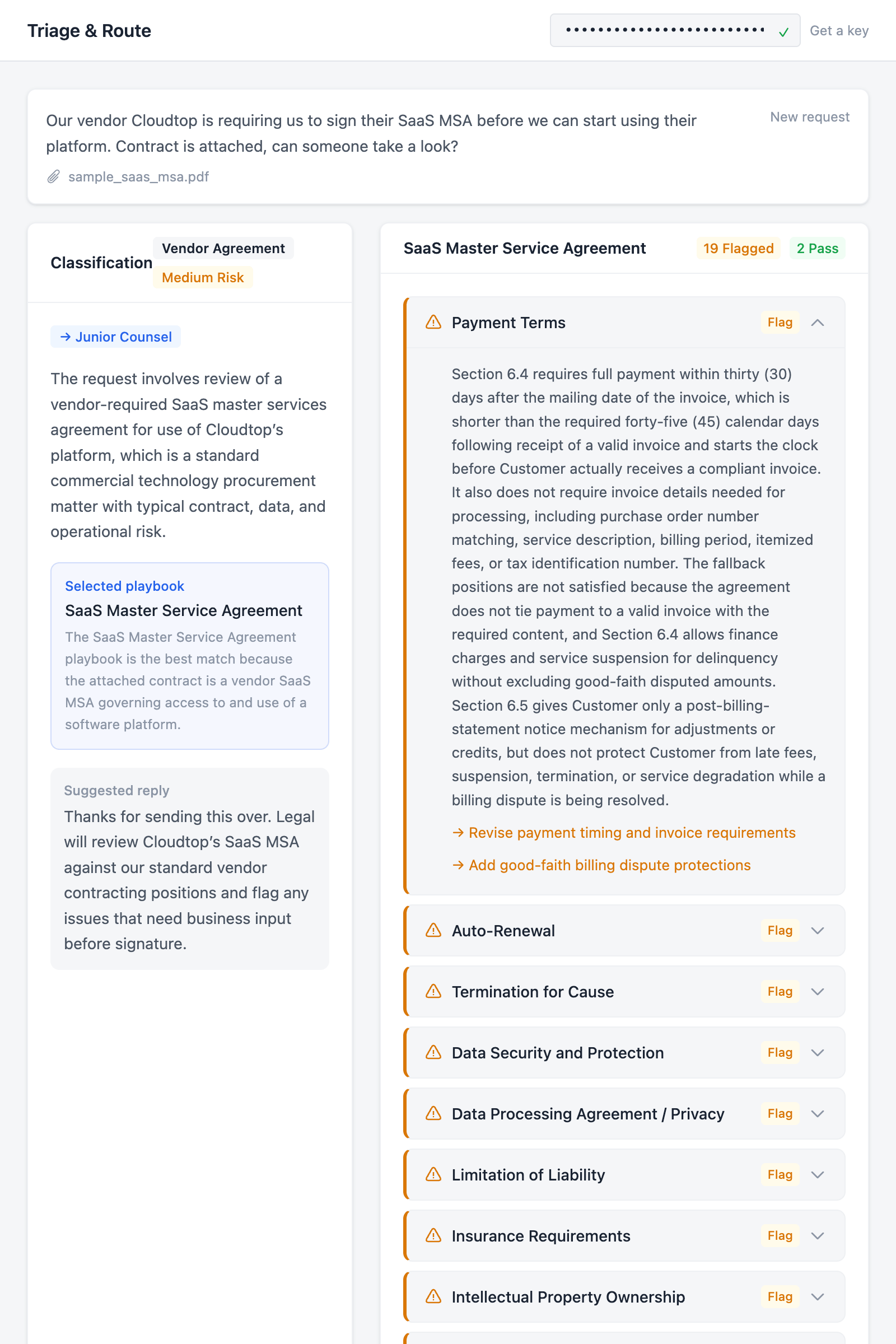
A two-panel webapp where a user describes a legal request, attaches a contract, and clicks "Triage Request." The app classifies the request (category, risk level, routing lane), selects the most relevant playbook from the user's GC AI account, and runs that playbook against the document. The left panel shows the classification. The right panel shows every playbook check with pass/flag results and suggested revisions.

## API endpoints

| Method | Endpoint                                                        | What it does                                                  |
| ------ | --------------------------------------------------------------- | ------------------------------------------------------------- |
| `GET`  | [`/v1/folders`](/api-reference/list-folders)                    | Validates the API key on paste                                |
| `GET`  | [`/v1/playbooks`](/api-reference/list-playbooks)                | Fetches available playbooks from the user's account           |
| `POST` | [`/v1/chat/completions`](/api-reference/create-chat-completion) | Classifies the request and picks a playbook (async, `wait=0`) |
| `GET`  | [`/v1/jobs/:id`](/api-reference/get-async-job)                  | Polls until the classification or playbook run finishes       |
| `POST` | [`/v1/files`](/api-reference/upload-file)                       | Uploads the attached document                                 |
| `GET`  | [`/v1/files/:id`](/api-reference/get-file-status)               | Polls until the file is processed                             |
| `POST` | [`/v1/playbooks/:id/run`](/api-reference/run-playbook)          | Runs the selected playbook against the document               |

Want to skip ahead? [View on GitHub](https://github.com/GC-AI-Inc/api-demo-triage) or [run on Replit](https://replit.com/github/GC-AI-Inc/api-demo-triage).

## Prerequisites

* A [GC AI API key](/api-reference/introduction#authentication) (get one from **Settings > API** in the app)
* At least one completed playbook in your GC AI account
* [Node.js](https://nodejs.org/) 18+

## Build the app

<Steps>
  <Step title="Scaffold the project">
    Create a new Vite + React + TypeScript project and install Tailwind CSS:

    ```bash theme={null}
    npm create vite@latest api-demo-triage -- --template react-ts
    cd api-demo-triage
    npm install tailwindcss @tailwindcss/vite
    npm install
    ```

    Open `vite.config.ts` and add the Tailwind plugin plus an API proxy for development:

    ```typescript vite.config.ts theme={null}
    import { defineConfig } from "vite";
    import react from "@vitejs/plugin-react";
    import tailwindcss from "@tailwindcss/vite";

    export default defineConfig({
      plugins: [react(), tailwindcss()],
      server: {
        proxy: {
          "/api": {
            target: "https://app.gc.ai",
            changeOrigin: true,
          },
        },
      },
    });
    ```

    The proxy forwards `/api` requests to GC AI during development so you don't hit CORS issues from `localhost`.

    Clear out the starter code and set up the theme:

    ```bash theme={null}
    rm src/App.css src/assets -rf
    ```

    Replace `src/index.css` with the Tailwind import and a color theme that covers classification badges, routing lanes, and check statuses:

    ```css src/index.css theme={null}
    @import "tailwindcss";

    @theme {
      --color-surface: #f5f6f8;
      --color-card: #ffffff;
      --color-border: #e2e5ea;
      --color-border-light: #eef0f3;
      --color-ink: #1a2332;
      --color-ink-secondary: #4b5563;
      --color-ink-muted: #8b95a5;
      --color-accent: #2563eb;
      --color-success: #16a34a;
      --color-error: #dc2626;
      --color-error-bg: #fef2f2;

      --color-risk-high: #dc2626;
      --color-risk-high-bg: #fef2f2;
      --color-risk-medium: #d97706;
      --color-risk-medium-bg: #fffbeb;
      --color-risk-low: #0891b2;
      --color-risk-low-bg: #ecfeff;

      --color-route-auto: #16a34a;
      --color-route-auto-bg: #f0fdf4;
      --color-route-junior: #2563eb;
      --color-route-junior-bg: #eff6ff;
      --color-route-senior: #d97706;
      --color-route-senior-bg: #fffbeb;
      --color-route-out: #6b7280;
      --color-route-out-bg: #f9fafb;

      --color-check-pass: #16a34a;
      --color-check-pass-bg: #f0fdf4;
      --color-check-flagged: #d97706;
      --color-check-flagged-bg: #fffbeb;
    }
    ```

    Create two empty files. These are the only two source files we'll write:

    ```bash theme={null}
    echo '' > src/api.ts
    echo 'export default function App() { return <div>hello</div> }' > src/App.tsx
    ```

    Run `npm run dev` to confirm the scaffold works before we start building.
  </Step>

  <Step title="Build the API client">
    The API client goes in `src/api.ts`. It wraps the GC AI endpoints into five functions: `validateApiKey`, `listPlaybooks`, `uploadFile`, `classifyRequest`, and `runPlaybook`.

    Start with the types. This demo has two main shapes: `Classification` (from the AI) and `PlaybookRunResult` (from the playbook API):

    ```typescript src/api.ts theme={null}
    export interface Playbook {
      id: string;
      title: string;
      description: string | null;
    }

    export interface Classification {
      category:
        | "nda"
        | "vendor-agreement"
        | "employment"
        | "ip-licensing"
        | "corporate"
        | "regulatory";
      risk: "high" | "medium" | "low";
      route:
        | "auto-handled"
        | "junior-counsel"
        | "senior-counsel"
        | "routed-out";
      rationale: string;
      suggestedReply: string;
      playbookId: string;
      playbookRationale: string;
    }

    export interface CheckResult {
      checkId: string;
      checkTitle: string;
      evaluationResult: "Pass" | "Flag" | "Fallback" | "Error";
      analysis?: string;
      revisions?: Array<{
        paragraphId: string;
        revisedText: string;
        revisionTitle: string;
      }>;
    }

    export interface PlaybookRunResult {
      playbookTitle: string;
      totalChecks: number;
      results: CheckResult[];
      summary: {
        flags: number;
        fallbacks: number;
        passes: number;
        errors: number;
      };
    }

    interface FileResponse {
      id: string;
      name: string;
      status: "pending" | "processing" | "ready" | "failed";
    }

    interface JobResponse<T> {
      job_id: string;
      kind: string;
      status: "pending" | "running" | "succeeded" | "failed" | "canceled";
      result: T | null;
      error: { code: string; message: string } | null;
      created_at: string;
      completed_at: string | null;
    }

    interface ChatResult {
      result: string;
      chat_id: string;
    }
    ```

    Next, a small helper that attaches the API key to every request and throws on non-2xx responses:

    ```typescript src/api.ts theme={null}
    const API_BASE = "/api/external/v1";

    async function apiRequest(
      apiKey: string,
      path: string,
      options: RequestInit = {},
    ): Promise<Response> {
      const res = await fetch(`${API_BASE}${path}`, {
        ...options,
        headers: {
          Authorization: apiKey,
          ...options.headers,
        },
      });
      if (!res.ok) {
        const body = await res.json().catch(() => ({}));
        throw new Error(
          (body as { error?: string }).error ??
            `API error ${res.status}: ${res.statusText}`,
        );
      }
      return res;
    }
    ```

    **Key validation and playbook listing.** `validateApiKey` checks the key with a lightweight folders call. `listPlaybooks` fetches all completed playbooks from the user's account:

    ```typescript src/api.ts theme={null}
    export async function validateApiKey(apiKey: string): Promise<boolean> {
      try {
        const res = await fetch(`${API_BASE}/folders?limit=1`, {
          headers: { Authorization: apiKey },
        });
        return res.ok;
      } catch {
        return false;
      }
    }

    export async function listPlaybooks(
      apiKey: string,
    ): Promise<Playbook[]> {
      const res = await apiRequest(apiKey, "/playbooks?limit=500");
      const data: {
        playbooks: Array<{
          id: string;
          title: string;
          description: string | null;
          status: string;
        }>;
      } = await res.json();
      return data.playbooks
        .filter((p) => p.status === "completed")
        .map((p) => ({ id: p.id, title: p.title, description: p.description }));
    }
    ```

    **File upload.** Same pattern as the heatmap demo: post the file, then poll until it's ready:

    ```typescript src/api.ts theme={null}
    export async function uploadFile(
      apiKey: string,
      file: File,
    ): Promise<FileResponse> {
      const form = new FormData();
      form.append("file", file);
      const res = await fetch(`${API_BASE}/files`, {
        method: "POST",
        headers: { Authorization: apiKey },
        body: form,
      });
      if (!res.ok) {
        const body = await res.json().catch(() => ({}));
        throw new Error(
          (body as { error?: string }).error ??
            `Upload failed: ${res.status} ${res.statusText}`,
        );
      }
      const uploaded: FileResponse = await res.json();
      return waitForFile(apiKey, uploaded.id);
    }

    async function waitForFile(
      apiKey: string,
      fileId: string,
    ): Promise<FileResponse> {
      for (let i = 0; i < 60; i++) {
        const res = await apiRequest(apiKey, `/files/${fileId}`);
        const file: FileResponse = await res.json();
        if (file.status === "ready") return file;
        if (file.status === "failed") throw new Error("File processing failed");
        await new Promise((r) => setTimeout(r, 2000));
      }
      throw new Error("Timed out waiting for file processing");
    }
    ```

    **Request classification.** This is the first novel piece. The prompt includes the list of playbooks so the model can pick the best match. It returns category, risk, routing lane, and the selected playbook ID:

    ```typescript src/api.ts theme={null}
    function buildClassifyPrompt(playbooks: Playbook[]): string {
      const playbookList = playbooks
        .map((p) => `  - ID: "${p.id}" | Title: "${p.title}"`)
        .join("\n");

      return `You are a legal intake triage system. Classify this incoming legal request, then select the most relevant playbook to run against the attached document.

    Return a JSON object with exactly these fields:
    - "category": one of "nda", "vendor-agreement", "employment", "ip-licensing", "corporate", "regulatory"
    - "risk": "high", "medium", or "low"
    - "route": one of "auto-handled" (routine, low-risk items), "junior-counsel" (standard matters), "senior-counsel" (high-risk or high-value), "routed-out" (not a legal matter, forward elsewhere)
    - "rationale": one sentence explaining your classification and routing decision
    - "suggestedReply": a brief, professional reply to the requester acknowledging receipt and outlining next steps
    - "playbookId": the ID of the most relevant playbook from the list below, or "" if none match
    - "playbookRationale": one sentence explaining why this playbook was selected

    Available playbooks:
    ${playbookList}

    Return ONLY the JSON object, no other text.`;
    }

    export async function classifyRequest(
      apiKey: string,
      requestText: string,
      playbooks: Playbook[],
    ): Promise<Classification> {
      const prompt = buildClassifyPrompt(playbooks);
      const res = await apiRequest(apiKey, "/chat/completions?wait=0", {
        method: "POST",
        headers: { "Content-Type": "application/json" },
        body: JSON.stringify({
          message: `${prompt}\n\nRequest:\n${requestText}`,
        }),
      });
      const job: JobResponse<ChatResult> = await res.json();
      if (job.status === "failed") {
        throw new Error(job.error?.message ?? "Classification failed");
      }
      return waitForClassification(apiKey, job.job_id);
    }

    async function waitForClassification(
      apiKey: string,
      jobId: string,
    ): Promise<Classification> {
      for (let i = 0; i < 90; i++) {
        await new Promise((r) => setTimeout(r, 2000));
        const res = await apiRequest(apiKey, `/jobs/${jobId}`);
        const job: JobResponse<ChatResult> = await res.json();
        if (job.status === "succeeded" && job.result) {
          return parseClassification(job.result.result);
        }
        if (job.status === "failed") {
          throw new Error(job.error?.message ?? "Classification failed");
        }
      }
      throw new Error("Timed out waiting for classification");
    }

    function parseClassification(text: string): Classification {
      const jsonMatch = text.match(/\{[\s\S]*\}/);
      if (!jsonMatch) throw new Error("Could not parse classification response");
      return JSON.parse(jsonMatch[0]);
    }
    ```

    **Playbook run.** The second novel piece. Instead of crafting our own review prompt, we call the real playbook API. It runs every check the playbook defines and returns structured results:

    ```typescript src/api.ts theme={null}
    export async function runPlaybook(
      apiKey: string,
      playbookId: string,
      fileIds: string[],
    ): Promise<PlaybookRunResult> {
      const res = await apiRequest(apiKey, `/playbooks/${playbookId}/run?wait=0`, {
        method: "POST",
        headers: { "Content-Type": "application/json" },
        body: JSON.stringify({ file_ids: fileIds }),
      });
      const job: JobResponse<PlaybookRunResult> = await res.json();
      if (job.status === "failed") {
        throw new Error(job.error?.message ?? "Playbook run failed");
      }
      if (job.status === "succeeded" && job.result) {
        return job.result;
      }
      return waitForPlaybook(apiKey, job.job_id);
    }

    async function waitForPlaybook(
      apiKey: string,
      jobId: string,
    ): Promise<PlaybookRunResult> {
      for (let i = 0; i < 120; i++) {
        await new Promise((r) => setTimeout(r, 3000));
        const res = await apiRequest(apiKey, `/jobs/${jobId}`);
        const job: JobResponse<PlaybookRunResult> = await res.json();
        if (job.status === "succeeded" && job.result) {
          return job.result;
        }
        if (job.status === "failed") {
          throw new Error(job.error?.message ?? "Playbook run failed");
        }
      }
      throw new Error("Timed out waiting for playbook run");
    }
    ```

    That's the whole API layer. Five exported functions: `validateApiKey`, `listPlaybooks`, `uploadFile`, `classifyRequest`, and `runPlaybook`. The playbook polling uses a 3-second interval and longer timeout since playbook runs with many checks can take a few minutes.
  </Step>

  <Step title="App shell: header, key validation, and playbook loading">
    Now we start building `src/App.tsx`. This first pass sets up the header with the API key input, loads playbooks once the key validates, and adds the footer. The layout is wider than the heatmap demo (`max-w-5xl` instead of `max-w-3xl`) because we'll use a two-column layout for results.

    ```tsx src/App.tsx theme={null}
    import { useCallback, useEffect, useState } from "react";
    import {
      validateApiKey,
      listPlaybooks,
      uploadFile,
      classifyRequest,
      runPlaybook,
    } from "./api";
    import type {
      Playbook,
      Classification,
      CheckResult,
      PlaybookRunResult,
    } from "./api";

    function App() {
      const [apiKey, setApiKey] = useState(
        () => localStorage.getItem("gcai_api_key") ?? "",
      );
      const [keyValid, setKeyValid] = useState<boolean | null>(null);
      const [keyChecking, setKeyChecking] = useState(false);
      const [playbooks, setPlaybooks] = useState<Playbook[]>([]);

      const checkKey = useCallback(async (key: string) => {
        if (!key.trim()) {
          setKeyValid(null);
          return;
        }
        setKeyChecking(true);
        const valid = await validateApiKey(key.trim());
        setKeyValid(valid);
        setKeyChecking(false);
        if (valid) {
          localStorage.setItem("gcai_api_key", key.trim());
          listPlaybooks(key.trim()).then(setPlaybooks).catch(() => {});
        }
      }, []);

      useEffect(() => {
        if (apiKey) checkKey(apiKey);
      }, []);

      function handleKeyChange(e: React.ChangeEvent<HTMLInputElement>) {
        setApiKey(e.target.value);
        setKeyValid(null);
      }

      return (
        <div className="flex min-h-screen flex-col bg-surface">
          <header className="border-b border-border bg-card px-6 py-3">
            <div className="mx-auto flex max-w-5xl items-center justify-between gap-4">
              <h1 className="shrink-0 text-base font-semibold text-ink">
                Triage &amp; Route
              </h1>
              <form
                onSubmit={(e) => { e.preventDefault(); checkKey(apiKey); }}
                className="flex items-center gap-2"
              >
                <div className="relative">
                  <input
                    type="password"
                    value={apiKey}
                    onChange={handleKeyChange}
                    onBlur={() => checkKey(apiKey)}
                    placeholder="Paste your GC AI API key"
                    className="w-56 rounded border border-border bg-surface px-3 py-1.5 pr-8 font-mono text-xs text-ink placeholder:text-ink-muted focus:border-accent focus:ring-1 focus:ring-accent focus:outline-none"
                  />
                  <span className="absolute top-1/2 right-2.5 -translate-y-1/2">
                    {keyChecking && (
                      <span className="block size-3 animate-spin rounded-full border border-border border-t-accent" />
                    )}
                    {!keyChecking && keyValid === true && (
                      <span className="text-xs text-success">&#10003;</span>
                    )}
                    {!keyChecking && keyValid === false && (
                      <span className="text-xs text-error">&#10007;</span>
                    )}
                  </span>
                </div>
                <a
                  href="https://app.gc.ai/settings/api"
                  target="_blank"
                  rel="noopener noreferrer"
                  className="whitespace-nowrap text-xs text-ink-muted hover:text-accent"
                >
                  Get a key
                </a>
              </form>
            </div>
          </header>

          <main className="mx-auto flex w-full max-w-5xl flex-1 flex-col px-6 py-6">
            {/* We'll fill this in over the next steps */}
          </main>

          <footer className="border-t border-border px-6 py-3 text-center text-xs text-ink-muted">
            Powered by the{" "}
            <a
              href="https://docs.gc.ai/api-reference/introduction"
              target="_blank"
              rel="noopener noreferrer"
              className="text-accent hover:underline"
            >
              GC AI API
            </a>
          </footer>
        </div>
      );
    }

    export default App;
    ```

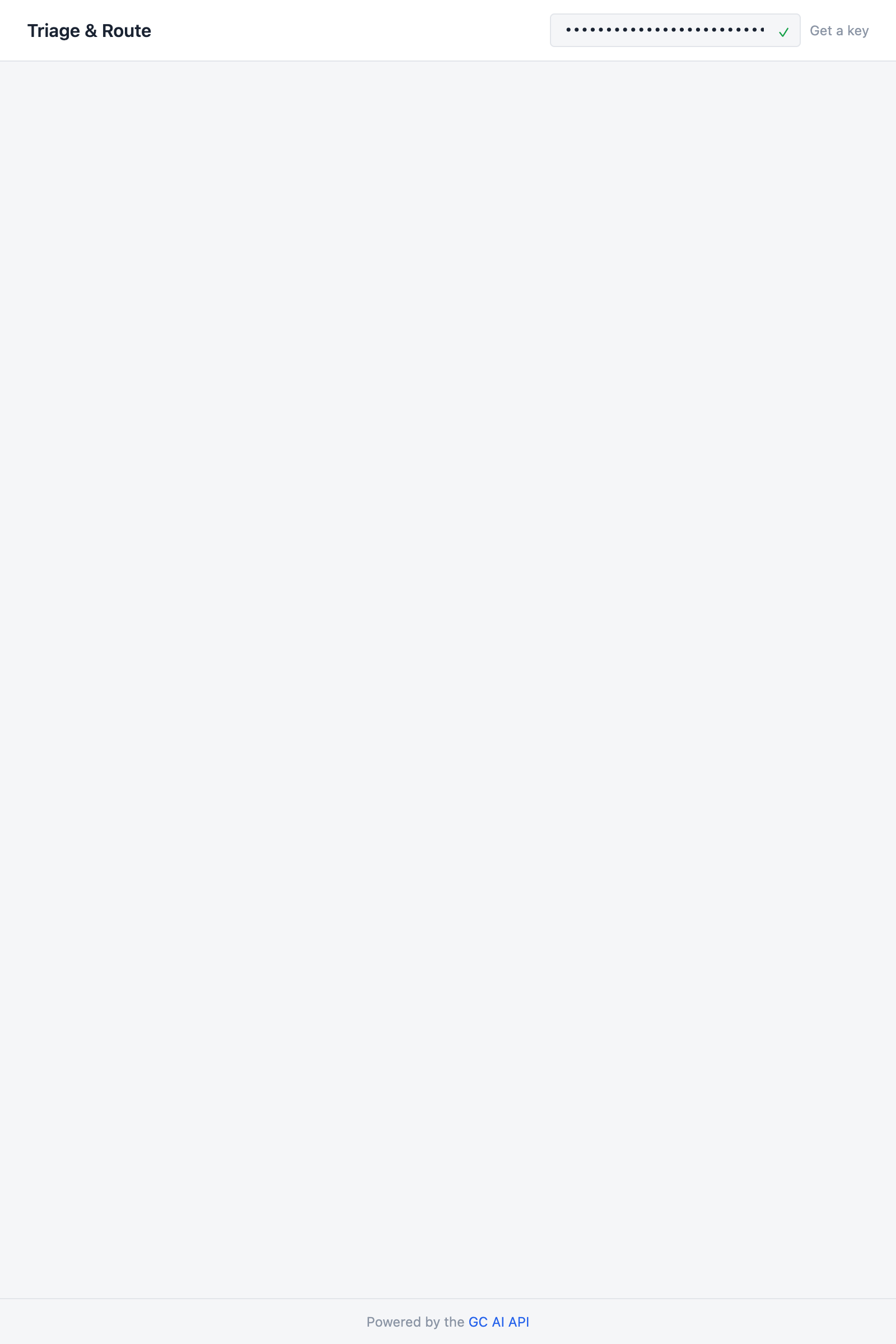
    When the key validates, `listPlaybooks` runs in the background. The playbooks are stored in state so the classification prompt can include them later. You won't see them in the UI yet.

    <Frame>
      <img src="https://mintcdn.com/gcai/PDDupZNWNlKAYZ3B/images/demo-triage-key-validated.png?fit=max&auto=format&n=PDDupZNWNlKAYZ3B&q=85&s=5f62ea09fa0087de0853c3be83c82706" alt="App header showing Triage and Route title with a validated API key and empty request form" width="1600" height="2400" data-path="images/demo-triage-key-validated.png" />
    </Frame>
  </Step>

  <Step title="Request form">
    Add a `RequestForm` component above the `App` function. It has a text area for describing the request and an optional file upload:

    ```tsx src/App.tsx (above App) theme={null}
    function RequestForm({
      onSubmit,
      disabled,
    }: {
      onSubmit: (requestText: string, file?: File) => void;
      disabled: boolean;
    }) {
      const [text, setText] = useState("");
      const [file, setFile] = useState<File | null>(null);
      const [dragOver, setDragOver] = useState(false);

      function handleSubmit(e: React.FormEvent) {
        e.preventDefault();
        if (!text.trim()) return;
        onSubmit(text.trim(), file ?? undefined);
      }

      const handleDrop = useCallback((e: React.DragEvent) => {
        e.preventDefault();
        setDragOver(false);
        const dropped = e.dataTransfer.files[0];
        if (dropped) setFile(dropped);
      }, []);

      return (
        <form onSubmit={handleSubmit} className="flex w-full flex-col gap-4">
          <div>
            <label htmlFor="request-text" className="mb-1.5 block text-sm font-medium text-ink">
              Describe your request
            </label>
            <textarea
              id="request-text"
              value={text}
              onChange={(e) => setText(e.target.value)}
              placeholder='e.g. "We need to sign an NDA with Acme Corp before sharing our product roadmap. They sent over their template, attached."'
              rows={4}
              disabled={disabled}
              className="w-full resize-none rounded-lg border border-border bg-card px-3 py-2 text-sm text-ink placeholder:text-ink-muted focus:border-accent focus:ring-1 focus:ring-accent focus:outline-none disabled:opacity-50"
            />
          </div>

          <div>
            <label className="mb-1.5 block text-sm font-medium text-ink">
              Attach a document{" "}
              <span className="font-normal text-ink-muted">(optional)</span>
            </label>
            <div
              onDragOver={(e) => { e.preventDefault(); setDragOver(true); }}
              onDragLeave={() => setDragOver(false)}
              onDrop={handleDrop}
              onClick={() => { if (!disabled) document.getElementById("file-input")?.click(); }}
              className={`flex w-full cursor-pointer items-center justify-center rounded-lg border-2 border-dashed p-6 transition-colors ${
                dragOver ? "border-accent bg-accent/5" : "border-border hover:border-ink-muted"
              } ${disabled ? "pointer-events-none opacity-50" : ""}`}
            >
              {file ? (
                <div className="flex items-center gap-2 text-sm text-ink-secondary">
                  <svg className="size-4 text-success" fill="none" viewBox="0 0 24 24" stroke="currentColor" strokeWidth={2}>
                    <path strokeLinecap="round" strokeLinejoin="round" d="M9 12l2 2 4-4" />
                  </svg>
                  <span>{file.name}</span>
                  <button type="button" onClick={(e) => { e.stopPropagation(); setFile(null); }} className="ml-1 text-ink-muted hover:text-error">
                    &times;
                  </button>
                </div>
              ) : (
                <p className="text-sm text-ink-muted">
                  Drop a file here, or <span className="font-medium text-accent">browse</span>
                </p>
              )}
            </div>
            <input id="file-input" type="file" accept=".pdf,.docx,.doc,.txt"
              onChange={(e) => { const f = e.target.files?.[0]; if (f) setFile(f); }}
              className="hidden"
            />
          </div>

          <button type="submit" disabled={disabled || !text.trim()}
            className="self-start rounded-lg bg-accent px-5 py-2 text-sm font-medium text-white shadow-sm transition-colors hover:bg-accent/90 disabled:opacity-50">
            Triage Request
          </button>
        </form>
      );
    }
    ```

    Also add a `RequestSummary` component that displays the submitted request after the form is replaced:

    ```tsx src/App.tsx (above App) theme={null}
    interface RequestContext {
      requestText: string;
      fileName?: string;
    }

    function RequestSummary({
      request,
      onReset,
    }: {
      request: RequestContext;
      onReset: () => void;
    }) {
      return (
        <div className="w-full rounded-lg border border-border-light bg-card p-4 shadow-sm">
          <div className="flex items-start justify-between gap-4">
            <div className="min-w-0 flex-1">
              <p className="text-sm leading-relaxed text-ink-secondary">
                {request.requestText}
              </p>
              {request.fileName && (
                <div className="mt-2 flex items-center gap-1.5 text-xs text-ink-muted">
                  <svg className="size-3.5 shrink-0" fill="none" viewBox="0 0 24 24" stroke="currentColor" strokeWidth={1.5}>
                    <path strokeLinecap="round" strokeLinejoin="round"
                      d="m18.375 12.739-7.693 7.693a4.5 4.5 0 0 1-6.364-6.364l10.94-10.94A3 3 0 1 1 19.5 7.372L8.552 18.32m.009-.01-.01.01m5.699-9.941-7.81 7.81a1.5 1.5 0 0 0 2.112 2.13" />
                  </svg>
                  <span>{request.fileName}</span>
                </div>
              )}
            </div>
            <button onClick={onReset} className="shrink-0 text-xs text-ink-muted hover:text-accent">
              New request
            </button>
          </div>
        </div>
      );
    }
    ```

    <Frame>
      <img src="https://mintcdn.com/gcai/PDDupZNWNlKAYZ3B/images/demo-triage-form.png?fit=max&auto=format&n=PDDupZNWNlKAYZ3B&q=85&s=b3c1e49288da58128c1676240f0f9a8e" alt="Request form with a text area, file upload zone with a selected PDF, and Triage Request button" width="1600" height="2400" data-path="images/demo-triage-form.png" />
    </Frame>
  </Step>

  <Step title="Classification panel">
    Add the classification panel that displays on the left side of the results. It shows the category, risk level, routing lane, the selected playbook, and a suggested reply:

    ```tsx src/App.tsx (above App) theme={null}
    const riskStyles = {
      high: { badge: "bg-risk-high-bg text-risk-high", label: "High Risk" },
      medium: { badge: "bg-risk-medium-bg text-risk-medium", label: "Medium Risk" },
      low: { badge: "bg-risk-low-bg text-risk-low", label: "Low Risk" },
    };

    const routeStyles: Record<Classification["route"], { badge: string; label: string }> = {
      "auto-handled": { badge: "bg-route-auto-bg text-route-auto", label: "Auto-Handled" },
      "junior-counsel": { badge: "bg-route-junior-bg text-route-junior", label: "Junior Counsel" },
      "senior-counsel": { badge: "bg-route-senior-bg text-route-senior", label: "Senior Counsel" },
      "routed-out": { badge: "bg-route-out-bg text-route-out", label: "Routed Out" },
    };

    const categoryLabels: Record<Classification["category"], string> = {
      nda: "NDA",
      "vendor-agreement": "Vendor Agreement",
      employment: "Employment",
      "ip-licensing": "IP & Licensing",
      corporate: "Corporate",
      regulatory: "Regulatory",
    };

    function ClassificationPanel({
      classification,
      selectedPlaybook,
    }: {
      classification: Classification;
      selectedPlaybook?: Playbook;
    }) {
      const risk = riskStyles[classification.risk];
      const route = routeStyles[classification.route];

      return (
        <>
          <div className="flex items-center justify-between border-b border-border-light px-5 py-3">
            <h2 className="text-sm font-semibold text-ink">Classification</h2>
            <div className="flex flex-wrap gap-1.5">
              <span className="rounded bg-surface px-2 py-0.5 text-xs font-semibold text-ink">
                {categoryLabels[classification.category]}
              </span>
              <span className={`rounded px-2 py-0.5 text-xs font-medium ${risk.badge}`}>
                {risk.label}
              </span>
            </div>
          </div>

          <div className="flex-1 overflow-y-auto p-5">
            <div className="mb-4 flex items-center gap-2">
              <span className={`rounded px-2 py-0.5 text-xs font-medium ${route.badge}`}>
                &rarr; {route.label}
              </span>
            </div>

            <p className="text-sm leading-relaxed text-ink-secondary">
              {classification.rationale}
            </p>

            {selectedPlaybook && (
              <div className="mt-4 rounded-lg border border-accent/20 bg-accent/5 p-3">
                <p className="mb-1 text-xs font-medium text-accent">Selected playbook</p>
                <p className="text-sm font-medium text-ink">{selectedPlaybook.title}</p>
                {classification.playbookRationale && (
                  <p className="mt-1 text-xs leading-relaxed text-ink-muted">
                    {classification.playbookRationale}
                  </p>
                )}
              </div>
            )}

            <div className="mt-4 rounded-lg bg-surface p-3">
              <p className="mb-1 text-xs font-medium text-ink-muted">Suggested reply</p>
              <p className="text-sm leading-relaxed text-ink-secondary">
                {classification.suggestedReply}
              </p>
            </div>
          </div>
        </>
      );
    }
    ```

    The category and risk badges sit in the panel's header bar. The routing lane, rationale, selected playbook, and suggested reply fill the body. The "Selected playbook" block has a distinct accent-colored border so it stands out as the routing decision.
  </Step>

  <Step title="Playbook results panel">
    Add the playbook panel that displays on the right side. Each check is collapsible, showing just the title and Pass/Flag badge until clicked. The analysis text is cleaned to strip internal citation tags:

    ```tsx src/App.tsx (above App) theme={null}
    function cleanText(text: string): string {
      return text
        .replace(/<cite[^>]*\/>/g, "")
        .replace(/\*\*/g, "")
        .trim();
    }

    function CheckCard({ check }: { check: CheckResult }) {
      const [expanded, setExpanded] = useState(false);
      const passed = check.evaluationResult === "Pass";
      const flagged =
        check.evaluationResult === "Flag" ||
        check.evaluationResult === "Fallback";
      const hasDetails =
        (check.analysis && check.analysis.trim().length > 0) ||
        (check.revisions && check.revisions.length > 0);

      return (
        <div className={`rounded-lg border border-border-light border-l-[3px] bg-surface ${
          passed ? "border-l-check-pass"
            : flagged ? "border-l-check-flagged"
            : "border-l-border"
        }`}>
          <button type="button"
            onClick={() => hasDetails && setExpanded(!expanded)}
            className={`flex w-full items-center gap-2 px-4 py-3 text-left ${hasDetails ? "cursor-pointer" : "cursor-default"}`}
          >
            {passed ? (
              <svg className="size-4 shrink-0 text-check-pass" fill="none" viewBox="0 0 24 24" stroke="currentColor" strokeWidth={2}>
                <path strokeLinecap="round" strokeLinejoin="round" d="M5 13l4 4L19 7" />
              </svg>
            ) : flagged ? (
              <svg className="size-4 shrink-0 text-check-flagged" fill="none" viewBox="0 0 24 24" stroke="currentColor" strokeWidth={2}>
                <path strokeLinecap="round" strokeLinejoin="round"
                  d="M12 9v3.75m-9.303 3.376c-.866 1.5.217 3.374 1.948 3.374h14.71c1.73 0 2.813-1.874 1.948-3.374L13.949 3.378c-.866-1.5-3.032-1.5-3.898 0L2.697 16.126ZM12 15.75h.007v.008H12v-.008Z" />
              </svg>
            ) : (
              <svg className="size-4 shrink-0 text-ink-muted" fill="none" viewBox="0 0 24 24" stroke="currentColor" strokeWidth={2}>
                <path strokeLinecap="round" strokeLinejoin="round"
                  d="M12 9v3.75m9-.75a9 9 0 1 1-18 0 9 9 0 0 1 18 0Zm-9 3.75h.008v.008H12v-.008Z" />
              </svg>
            )}
            <span className="flex-1 text-sm font-medium text-ink">{check.checkTitle}</span>
            <span className={`shrink-0 rounded px-1.5 py-0.5 text-[11px] font-medium ${
              passed ? "bg-check-pass-bg text-check-pass"
                : flagged ? "bg-check-flagged-bg text-check-flagged"
                : "bg-card text-ink-muted"
            }`}>
              {check.evaluationResult}
            </span>
            {hasDetails && (
              <svg className={`size-4 shrink-0 text-ink-muted transition-transform ${expanded ? "rotate-180" : ""}`}
                fill="none" viewBox="0 0 24 24" stroke="currentColor" strokeWidth={2}>
                <path strokeLinecap="round" strokeLinejoin="round" d="m19.5 8.25-7.5 7.5-7.5-7.5" />
              </svg>
            )}
          </button>

          {expanded && (
            <div className="border-t border-border-light px-4 pb-4 pt-3">
              {check.analysis && (
                <p className="pl-6 text-[13px] leading-relaxed text-ink-secondary">
                  {cleanText(check.analysis)}
                </p>
              )}
              {check.revisions?.map((rev, i) => (
                <p key={i} className="mt-2 pl-6 text-[13px] leading-relaxed text-check-flagged">
                  &rarr; {rev.revisionTitle}
                </p>
              ))}
            </div>
          )}
        </div>
      );
    }

    function PlaybookPanel({ result }: { result: PlaybookRunResult }) {
      return (
        <>
          <div className="flex items-center justify-between border-b border-border-light px-5 py-3">
            <h2 className="text-sm font-semibold text-ink">{result.playbookTitle}</h2>
            <div className="flex gap-2 text-xs">
              {result.summary.flags > 0 && (
                <span className="rounded bg-check-flagged-bg px-1.5 py-0.5 font-medium text-check-flagged">
                  {result.summary.flags} Flagged
                </span>
              )}
              {result.summary.passes > 0 && (
                <span className="rounded bg-check-pass-bg px-1.5 py-0.5 font-medium text-check-pass">
                  {result.summary.passes} Pass
                </span>
              )}
              {result.summary.fallbacks > 0 && (
                <span className="rounded bg-risk-medium-bg px-1.5 py-0.5 font-medium text-risk-medium">
                  {result.summary.fallbacks} Fallback
                </span>
              )}
            </div>
          </div>

          <div className="flex-1 space-y-2 overflow-y-auto p-5">
            {result.results.map((check) => (
              <CheckCard key={check.checkId} check={check} />
            ))}
          </div>
        </>
      );
    }
    ```

    `cleanText` strips `<cite id="..."/>` tags and `**` bold markers that the playbook system uses internally for citations and emphasis. These are useful in the product UI but would look like raw markup in our demo.
  </Step>

  <Step title="Wire it up">
    The last piece is the state machine and the three-section layout that brings everything together.

    Define the status type above the `App` function:

    ```tsx src/App.tsx (above App) theme={null}
    type Status =
      | { step: "idle" }
      | { step: "classifying"; request: RequestContext }
      | { step: "uploading"; request: RequestContext; classification: Classification; file: File }
      | { step: "reviewing"; request: RequestContext; classification: Classification }
      | { step: "done"; request: RequestContext; classification: Classification; playbookResult?: PlaybookRunResult }
      | { step: "error"; message: string };
    ```

    Each step carries everything the UI needs. The `request` context travels through every state so the summary bar always has it. The `classification` appears once classification finishes and stays visible through upload and review.

    Add the state, handler, and derived values inside `App`:

    ```tsx theme={null}
    const [status, setStatus] = useState<Status>({ step: "idle" });

    const selectedPlaybook =
      status.step !== "idle" && status.step !== "error" && status.step !== "classifying"
        ? playbooks.find(
            (p) => p.id === (status as { classification: Classification }).classification.playbookId,
          )
        : undefined;

    async function handleSubmit(requestText: string, file?: File) {
      const key = apiKey.trim();
      const request: RequestContext = { requestText, fileName: file?.name };
      try {
        setStatus({ step: "classifying", request });
        const classification = await classifyRequest(key, requestText, playbooks);

        if (!file || !classification.playbookId) {
          setStatus({ step: "done", request, classification });
          return;
        }

        setStatus({ step: "uploading", request, classification, file });
        const uploaded = await uploadFile(key, file);

        setStatus({ step: "reviewing", request, classification });
        const playbookResult = await runPlaybook(key, classification.playbookId, [uploaded.id]);

        setStatus({ step: "done", request, classification, playbookResult });
      } catch (err) {
        setStatus({
          step: "error",
          message: err instanceof Error ? err.message : "Something went wrong",
        });
      }
    }

    function reset() {
      setStatus({ step: "idle" });
    }

    const hasClassification =
      status.step === "uploading" || status.step === "reviewing" || status.step === "done";
    const hasRequest = status.step !== "idle" && status.step !== "error";
    ```

    The handler runs four steps in sequence: classify, upload, run playbook, done. If there's no file or no matching playbook, it short-circuits to done after classification.

    Finally, fill in the `<main>` element. The layout has three sections: the request summary on top, then a two-column grid with classification on the left and playbook results on the right:

    ```tsx theme={null}
    <main className="mx-auto flex w-full max-w-5xl flex-1 flex-col px-6 py-6">
      {keyValid === false && (
        <div className="mb-4 rounded border border-error/20 bg-error-bg px-4 py-2 text-sm text-error">
          Invalid API key. Check your key in{" "}
          <a href="https://app.gc.ai/settings/api" target="_blank" rel="noopener noreferrer" className="underline">
            Settings &rarr; API
          </a>
        </div>
      )}

      {!keyValid && !keyChecking && status.step === "idle" && (
        <div className="flex flex-1 flex-col items-center justify-center">
          <div className="rounded-lg border border-dashed border-border p-16 text-center">
            <p className="text-sm text-ink-secondary">Enter your GC AI API key above to get started</p>
            <p className="mt-1 text-xs text-ink-muted">Classify legal requests and route them to the right playbook</p>
          </div>
        </div>
      )}

      {keyValid === true && status.step === "idle" && (
        <div className="mx-auto w-full max-w-2xl pt-4">
          <RequestForm onSubmit={handleSubmit} disabled={false} />
        </div>
      )}

      {hasRequest && (
        <>
          <RequestSummary
            request={(status as { request: RequestContext }).request}
            onReset={reset}
          />

          <div className="mt-4 grid min-h-0 flex-1 grid-cols-[2fr_3fr] gap-6 pb-4">
            {/* Left: Classification */}
            <div className="flex flex-col overflow-hidden rounded-lg border border-border-light bg-card shadow-sm">
              {status.step === "classifying" && (
                <div className="flex flex-1 flex-col items-center justify-center gap-3">
                  <div className="size-8 animate-spin rounded-full border-2 border-border border-t-accent" />
                  <p className="text-sm text-ink-secondary">Classifying request...</p>
                </div>
              )}
              {hasClassification && (
                <ClassificationPanel
                  classification={(status as { classification: Classification }).classification}
                  selectedPlaybook={selectedPlaybook}
                />
              )}
            </div>

            {/* Right: Playbook */}
            <div className="flex flex-col overflow-hidden rounded-lg border border-border-light bg-card shadow-sm">
              {status.step === "classifying" && (
                <div className="flex flex-1 flex-col items-center justify-center gap-3 text-sm text-ink-muted">
                  Waiting for classification...
                </div>
              )}
              {(status.step === "uploading" || status.step === "reviewing") && (
                <>
                  <div className="border-b border-border-light px-5 py-3">
                    <h2 className="text-sm font-semibold text-ink">
                      {selectedPlaybook?.title ?? "Playbook Review"}
                    </h2>
                  </div>
                  <div className="flex flex-1 flex-col items-center justify-center gap-3">
                    <div className="size-8 animate-spin rounded-full border-2 border-border border-t-accent" />
                    <p className="text-sm text-ink-secondary">
                      {status.step === "uploading"
                        ? "Uploading document..."
                        : "Running playbook, this may take a few minutes..."}
                    </p>
                  </div>
                </>
              )}
              {status.step === "done" && status.playbookResult && (
                <PlaybookPanel result={status.playbookResult} />
              )}
              {status.step === "done" && !status.playbookResult && (
                <div className="flex flex-1 flex-col items-center justify-center gap-2 p-5 text-center">
                  <p className="text-sm text-ink-muted">
                    {(status as { classification: Classification }).classification.playbookId
                      ? "No document attached, so no playbook was run."
                      : "No matching playbook found for this request type."}
                  </p>
                </div>
              )}
            </div>
          </div>
        </>
      )}

      {status.step === "error" && (
        <div className="flex flex-1 flex-col items-center justify-center gap-3">
          <div className="rounded border border-error/20 bg-error-bg px-4 py-3 text-sm text-error">
            {(status as { message: string }).message}
          </div>
          <button onClick={reset} className="text-sm text-accent hover:underline">Try again</button>
        </div>
      )}
    </main>
    ```

    Run `npm run dev`, paste your API key, describe a request like "Our vendor Cloudtop is requiring us to sign their SaaS MSA, contract attached," upload the PDF, and click **Triage Request**. The classification should appear in a few seconds on the left. The playbook results fill in on the right once the review finishes, which can take a few minutes for playbooks with many checks.

    <Frame>
      <img src="https://mintcdn.com/gcai/PDDupZNWNlKAYZ3B/images/demo-triage-results.png?fit=max&auto=format&n=PDDupZNWNlKAYZ3B&q=85&s=fc6f3b196ae30b2555da4cb06ab51506" alt="Finished app showing a classified vendor agreement on the left with the SaaS Master Service Agreement playbook selected, and collapsible check results on the right" width="1600" height="2400" data-path="images/demo-triage-results.png" />
    </Frame>
  </Step>
</Steps>

## Source code

<CardGroup cols={2}>
  <Card title="GitHub" href="https://github.com/GC-AI-Inc/api-demo-triage">
    Clone the repo and run locally
  </Card>

  <Card title="Replit" href="https://replit.com/github/GC-AI-Inc/api-demo-triage">
    Run it in the browser
  </Card>
</CardGroup>