- Also check out our courses here to become an expert at using GC AI.
Treat Your AI Like a Smart, Fast, Occasionally Overeager Human Intern
AI works for you. Think of it and talk to it like a smart human who wants to help you achieve your goals. To control AI’s trained overeagerness, provide clear, detailed instructions and specific prompts.
- GC AI is built specifically for legal work. It uses leading models from OpenAI, Anthropic, Google, and xAI, configured with legal-specific reasoning, tone, and workflows.
- General purpose AI tools disclaim heavily and are designed to refuse giving legal advice.
- GC AI includes purpose-built features for legal work: a Research Agent for parallel web research, smart file tools for document analysis, export in multiple formats, slides generation, and voice input.
- If details and exact language matter — which is essential for legal work — use a specialized tool such as GC AI.
Give Context
Provide the GC AI with context around your question so it can orient its response and give more accurate, tailored answers.
The more the AI knows about you, your company, your task, and why you’re asking the question, the better it can respond.
Note: In GC AI, you can provide your company context once in your Company Profile. This context is automatically used to provide organization-aware responses.
Opinion Overview (Official Prompt) Example
Take a look at using our official prompt for analyzing and reviewing a new legal opinion.
Example:
❌ Weak prompt:
“Review this deck.”
✅ Good prompt:
“[After inputting your Company Profile.] I am drafting a slide deck on how to comply with the new AI Executive Order. We’re working on training a new AI model. I want to ensure that the content is clear, actionable, and helpful for my company’s engineering team.”
Be Specific in Both Questions and Expected Responses
- The more specific your request, the more likely you are to get a specific, tailored answer.
- Vague prompts yield generic answers.
- Besides providing context, tell GC AI exactly what output you want.
- When asking it to compare things, specify what you want compared (provision by provision, payment terms, limitation of liability, etc.).
- Avoid pronouns and spell out acronyms.
Example:
❌ Weak prompt:
“Is this contract okay?”
✅ Good prompt:
“Review the attached employment contract for a senior software engineer position. Highlight clauses that could pose significant risks, focusing on intellectual property rights and termination clauses. Specify if any clauses deviate from standard industry practices or could potentially lead to legal disputes.”
Tell GC AI the Number of Items
- Specify the number of items you want in the response.
- This is especially useful for laws or issues where you know the right number of factors in a multi-factor test.
- Providing specific number goals increases your chances of getting a good response without follow-ups.
Example:
❌ Weak prompt:
“Summarize the attached letter.”
✅ Good prompt:
“Give me an 8-bullet overview of the attached letter from a US senator to our company.”
Provide Links or Documents When Available
If you know the document you need GC AI to use, provide the link or upload the document. This prevents the AI from hallucinating citations or pulling in irrelevant sources when searching the web.
Use hashtags (# for Heading 1, ## for Heading 2, ### for Heading 3) in your skills to structure information like headers in a document, making it easier for the AI to understand your requests.
AI models are trained on Markdown-formatted text and perform better with structured content. Markdown supports asterisks for **bold** and underscores for _italic_ text.
Iterate - One Step at a Time
Break down complex, multistep tasks into smaller steps. First get GC AI to break down a document, then ask for next steps, then request an outline based on those steps.
Start Fresh When Needed
If GC AI is giving you unsatisfactory answers, start a new chat rather than continuing in the same conversation. This wipes the AI’s memory of previous poor responses and allows you to ask in a different way.
Ask for Emojis to Add Glanceability
Request that GC AI use emojis to signify different things, making responses easier to understand at a glance. At GC AI, we use traffic lights (🔴, 🟡, 🟢) to signal high, medium, and low risk when analyzing contracts.
Use Tables for Better Readability
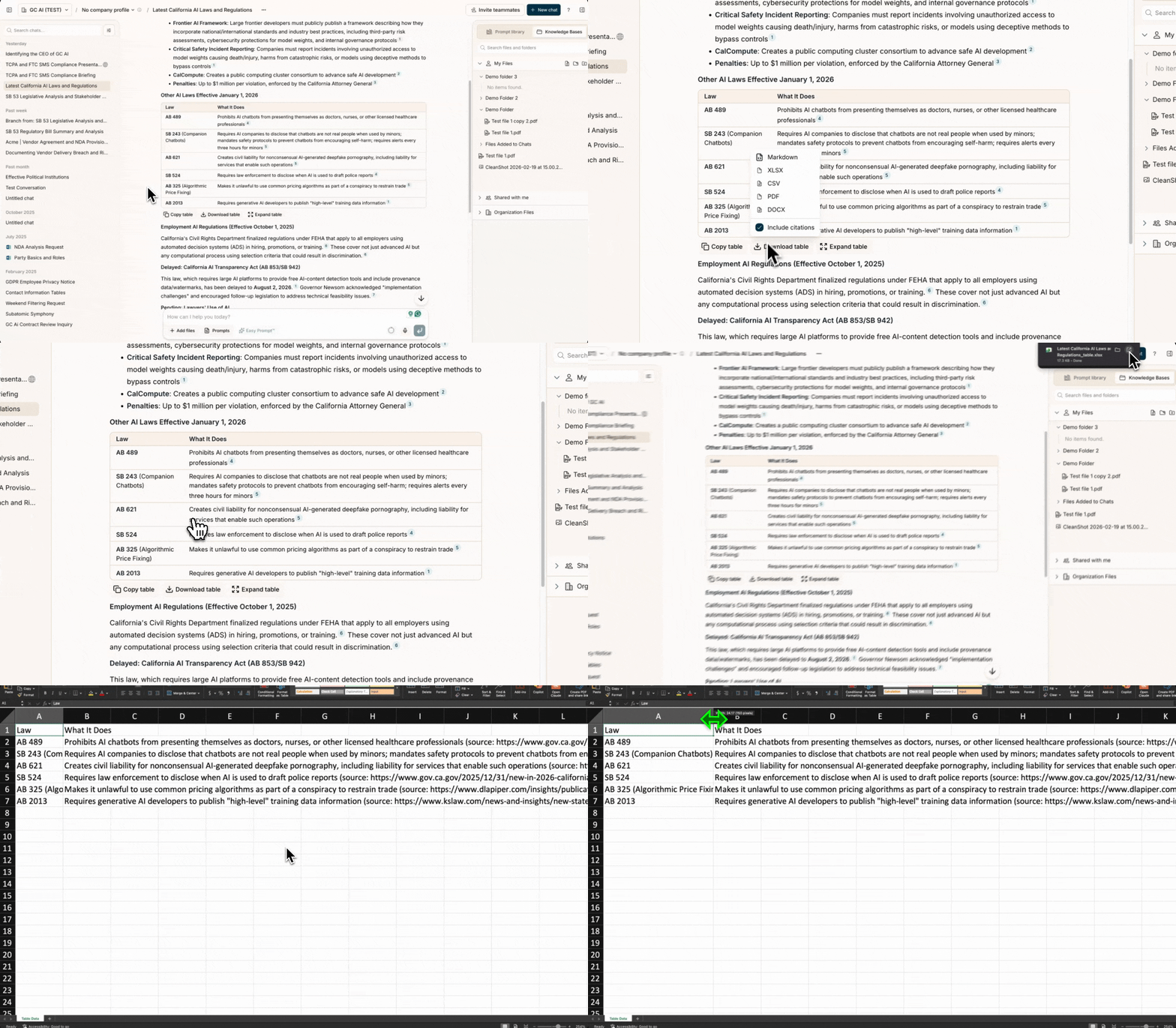
Tables make complex information easier to scan and understand. You can request the AI to format responses in tables and even export them to CSV for further analysis.
Example:
❌ Weak prompt:
“Compare these three contracts.”
✅ Good prompt:
“Create a table comparing the key provisions (termination rights, payment terms, and liability caps) across these three vendor agreements. Include a column for recommendations on each provision.”
When asking GC AI to compare language across contracts, analyze clauses, or provide a breakdown of different regulations by state, request output in table format for easier reading.
GC AI Reasons Automatically
For complex questions, GC AI automatically applies a structured 5-step reasoning process — scoping the question, systematically reviewing information, tracing patterns, checking for completeness, and reconciling findings. You don’t need to ask it to “think step by step” — this happens automatically.
Give the Model a Persona or Role
GC AI can take on virtually any persona or role with proper instructions. This is particularly useful when you want it to take the counterparty’s perspective to anticipate potential negotiation points in a transaction.
Watch for Terms of Art
When using specialized legal terminology or industry-specific terms, clarify what you mean. For example, “Revlon duties” has a specific meaning under Delaware corporate law. Last modified on September 23, 2026